Describe the bug
I create a schema as array of tuples, the validation is working properly but auto-complete is NOT.
The schema is validating as expected but auto-complete does not show suggestion for properties defined in the items. Instead, it is only showing properties in additionalItems
{
  "$schema": "http://json-schema.org/draft-07/schema#",
  "required": [
    "metadata"
  ],
  "type": "object",
  "additionalProperties": false,
  "properties": {
    "metadata": {
      "type": "object",
      "title": "Metadata",
      "properties": {
        "Selector": {
          "properties": {
            "query": {
              "title": "Construction",
              "type": "array",
              "items": [
                {
                  "oneOf": [
                    {
                      "$ref": "#/definitions/FUNC_item"
                    },
                    {
                      "$ref": "#/definitions/NOT_item"
                    }
                  ]
                }
              ],
              "additionalItems": {
                "$ref": "#/definitions/queryItem"
              }
            }
          }
        }
      }
    }
  },
  "definitions": {
    "FUNC_item": {
      "type": "object",
      "additionalProperties": false,
      "required": [
        "attribute",
        "operation",
        "value"
      ],
      "properties": {
        "attribute": {
          "type": "string"
        },
        "operation": {
          "type": "string"
        },
        "value": {
          "type": "string"
        }
      }
    },
    "NOT_item": {
      "type": "object",
      "additionalProperties": false,
      "properties": {
        "NOT": {
          "type": "array",
          "items": [
            {
              "$ref": "#/definitions/FUNC_item"
            }
          ],
          "additionalItems": {
            "$ref": "#/definitions/queryItem"
          }
        }
      }
    },
    "AND_Item": {
      "type": "object",
      "additionalProperties": false,
      "properties": {
        "AND": {
          "type": "array",
          "items": [
            {
              "oneOf": [
                {
                  "$ref": "#/definitions/FUNC_item"
                },
                {
                  "$ref": "#/definitions/NOT_item"
                }
              ]
            }
          ],
          "additionalItems": {
            "$ref": "#/definitions/queryItem"
          }
        }
      }
    },
    "OR_Item": {
      "type": "object",
      "additionalProperties": false,
      "properties": {
        "OR": {
          "type": "array",
          "items": [
            {
              "oneOf": [
                {
                  "$ref": "#/definitions/FUNC_item"
                },
                {
                  "$ref": "#/definitions/NOT_item"
                }
              ]
            }
          ],
          "additionalItems": {
            "$ref": "#/definitions/queryItem"
          }
        }
      }
    },
    "queryItem": {
      "oneOf": [

        {"$ref": "#/definitions/AND_Item"},
        {"$ref": "#/definitions/OR_Item"}
      ]
    }
  }
}
Here is validation from visual studio code, it's saying that first element should be FUNC_item or NOT_item
=> which is correct

But when I use Ctrl + Space to show auto-complete, it is showing AND and OR from the list
=> which is NOT correct because as per definition of schema, properties in items should be showing up in the auto-complete for first element of array.
"items": [
                {
                  "oneOf": [
                    {
                      "$ref": "#/definitions/FUNC_item"
                    },
                    {
                      "$ref": "#/definitions/NOT_item"
                    }
                  ]
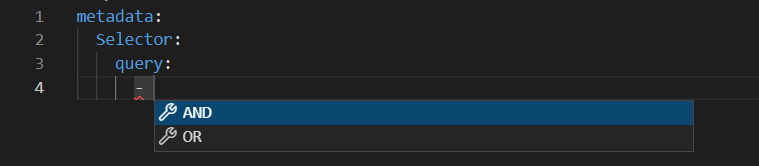
Expected Behavior
-
The auto-complete should show properties defined items for first element of array. Specifically, NOT and array item (having 3 properties "attribute", "operation", "value" ) should be showing up.
-
From second element onwards, the auto-complete shows AND and OR
Current Behavior
Steps to Reproduce
- Install Yaml Red Hat Visual Studio Extension to vsc
- Create a schema I shared above, name it schema.json
- Create the following settings.json in your working folder, specify your yaml files to validate against schema.json
{
"yaml.format.enable": true,
"yaml.schemas": {
  ".vscode/schema.json": [
    "test.yaml"
  ]
},
"yaml.completion": true,
"yaml.schemaStore.enable": true,
"[yaml]": {
  "editor.defaultFormatter": "redhat.vscode-yaml",


},
"workbench.editor.closeOnFileDelete": true
}
- Create the following test.yaml in your working folder, test auto-complete after
query property
metadata:
  Selector:
    query:
      -
Environment


Describe the bug
I create a schema as array of tuples, the validation is working properly but auto-complete is NOT.
The schema is validating as expected but auto-complete does not show suggestion for properties defined in the
items. Instead, it is only showing properties inadditionalItemsHere is validation from visual studio code, it's saying that first element should be FUNC_item or NOT_item

=> which is correct
But when I use Ctrl + Space to show auto-complete, it is showing AND and OR from the list
=> which is NOT correct because as per definition of schema, properties in
itemsshould be showing up in the auto-complete for first element of array.Expected Behavior
The auto-complete should show properties defined
itemsfor first element of array. Specifically, NOT and array item (having 3 properties "attribute", "operation", "value" ) should be showing up.From second element onwards, the auto-complete shows AND and OR
Current Behavior
Steps to Reproduce
querypropertyEnvironment