Version/Branch of Dear ImGui:
Version: 1.89.4
Branch: v1.89.4
Back-end/Renderer/Compiler/OS
Back-ends: imgui_impl_glfw.cpp + imgui_impl_opengl3.cpp
Compiler: VS2019
Operating System: Windows 11
My Issue/Question:
I'm creating a form for inputting a lot of data so I'm trying to move keyboard focus to the next item when pressing enter in an input item. For this I use ImGuiInputTextFlags_EnterReturnsTrue. It works fine for InputText() but for InputScalar()-based functions it only returns true if pressing enter and the contents was changed.
I realize there is a caveat "Most of the ImGuiInputTextFlags flags are only useful for InputText()" in the code but since this almost works perfectly I thought it might be useful to bring it up. Sorry if it's not!
Screenshots/Video
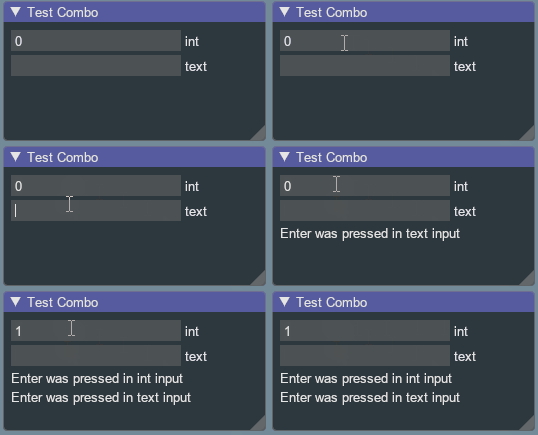
Standalone, minimal, complete and verifiable example:
// Here's some code anyone can copy and paste to reproduce your issue
ImGui::Begin("Example Bug");
static int v = 0;
static bool int_enter = false;
if (ImGui::InputInt("int", &v, 0, 0, ImGuiInputTextFlags_EnterReturnsTrue)) {
    int_enter = true;
}
static bool text_enter = false;
static char buf[128] = "";
if (ImGui::InputText("text", buf, 127, ImGuiInputTextFlags_EnterReturnsTrue)) {
    text_enter = true;
}
if (int_enter) {
    ImGui::TextUnformatted("Enter was pressed in int input");
}
if (text_enter) {
    ImGui::TextUnformatted("Enter was pressed in text input");
}
ImGui::End();
Version/Branch of Dear ImGui:
Version: 1.89.4
Branch: v1.89.4
Back-end/Renderer/Compiler/OS
Back-ends: imgui_impl_glfw.cpp + imgui_impl_opengl3.cpp
Compiler: VS2019
Operating System: Windows 11
My Issue/Question:
I'm creating a form for inputting a lot of data so I'm trying to move keyboard focus to the next item when pressing enter in an input item. For this I use
ImGuiInputTextFlags_EnterReturnsTrue. It works fine forInputText()but forInputScalar()-based functions it only returns true if pressing enter and the contents was changed.I realize there is a caveat "Most of the ImGuiInputTextFlags flags are only useful for InputText()" in the code but since this almost works perfectly I thought it might be useful to bring it up. Sorry if it's not!
Screenshots/Video

Standalone, minimal, complete and verifiable example: