[Help wanted] Add download button in actions menu#702
Conversation


 skjnldsv
added
2. developing
skjnldsv
added
2. developing

Signed-off-by: Florent Fayolle <florent.github-contributions@zeteo.me>
Signed-off-by: Florent Fayolle <florent.github-contributions@zeteo.me>
 fflorent
force-pushed
the
add-download-button
branch
from
fflorent
force-pushed
the
add-download-button
branch
from
2983947 to
95a1ed7
Compare
 skjnldsv
left a comment
skjnldsv
left a comment
skjnldsv
left a comment
There was a problem hiding this comment.
Getting close.
Still a few comments :)
| <ActionButton | ||
| icon="icon-download" | ||
| :close-after-click="true" | ||
| @click="onDownload"> | ||
| {{ t('viewer', 'Download') }} | ||
| </ActionButton> |
| * @param {object} fileInfo The fileInfo | ||
| * @returns {string} | ||
| */ | ||
| function genDavPath(fileInfo) { |
There was a problem hiding this comment.
More suitable: getDavPath
| function genDavPath(fileInfo) { | |
| function getDavPath(fileInfo) { |
There was a problem hiding this comment.
Also, please keep the same function declaration format
| function genDavPath(fileInfo) { | |
| const getDavPath = function(fileInfo) { |

This comment has been minimized.
This comment has been minimized.

|
Hey @fflorent, do you have any news? Do you need anything? :) |


|
One click download button would be ideal I believe. On mobile even gallery view is to small to really see the photo well and with many photos a two click action menu might be cumbersome... As illustrated: I don’t know what it would take to implement on mobile, but swipe gestures would be really great. swipe down to download to mobile device, swipe up to save it to your Nextcloud or go to where you have it saved. If I could code I would even add customizable swipe to make the whole planet happy. |

This addition is work of @fflorent , I finished his work from nextcloud#702
This addition is work of @fflorent , I finished his work from nextcloud#702

Signed-off-by: Robbert Gurdeep Singh <git@beardhatcode.be>
This addition is work of @fflorent , I finished his work from nextcloud#702

Signed-off-by: Robbert Gurdeep Singh <git@beardhatcode.be>

|
I addressed the comments in #814 |
|
See #814 |
This addition is work of @fflorent , I finished his work from nextcloud#702

Signed-off-by: Robbert Gurdeep Singh <git@beardhatcode.be>
This addition is work of @fflorent , I finished his work from nextcloud#702

Signed-off-by: Robbert Gurdeep Singh <git@beardhatcode.be>
This addition is work of @fflorent , I finished his work from nextcloud#702

Signed-off-by: Robbert Gurdeep Singh <git@beardhatcode.be>
This addition is work of @fflorent , I finished his work from nextcloud#702

Signed-off-by: Robbert Gurdeep Singh <git@beardhatcode.be>
This addition is work of @fflorent , I finished his work from nextcloud#702

Signed-off-by: Robbert Gurdeep Singh <git@beardhatcode.be>
This addition is work of @fflorent , I finished his work from nextcloud#702

Signed-off-by: Robbert Gurdeep Singh <git@beardhatcode.be>
This addition is work of @fflorent , I finished his work from nextcloud#702

Signed-off-by: Robbert Gurdeep Singh <git@beardhatcode.be>
This addition is work of @fflorent , I finished his work from nextcloud#702

Signed-off-by: Robbert Gurdeep Singh <git@beardhatcode.be>
This addition is work of @fflorent , I finished his work from nextcloud#702

Signed-off-by: Robbert Gurdeep Singh <git@beardhatcode.be>
5 participants


The need
As a user, when I preview a file, I would like to download it easily with few clicks.
Rationales
If a file is easily downloadable from the files action popup:
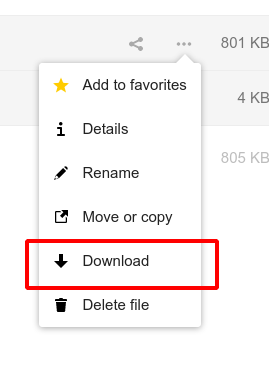
a user not used to Nextcloud may click on a file in order to download it and wouldn't discover this menu.
Hopefully there is an action menu in the top-right corner and I propose to add a download button there:

Technical considerations
I just add a button… Still it opens few questions to me :) :
OCA.Files.Files.handleDownloadmethod, but it requires a callback I don't need. Also I am not sure of its benefits here compared to a simplelocation.href = '…'for this case. Seems like it cookies are used, it's for knowing when the download starts.Cheers!