-------- Diagnostics - 23/07/2020, 19:25:09
Version: 0.29.0
Current Configuration:
{
    "name": "Win32",
    "includePath": [
        "${workspaceFolder}/**"
    ],
    "defines": [
        "_DEBUG",
        "UNICODE",
        "_UNICODE"
    ],
    "windowsSdkVersion": "10.0.18362.0",
    "cStandard": "c11",
    "cppStandard": "c++17",
    "intelliSenseMode": "msvc-x64",
    "compilerPath": "C:/Program Files (x86)/GNU Tools ARM Embedded/8 2018-q4-major/bin/arm-none-eabi-gcc.exe",
    "compilerArgs": [],
    "browse": {
        "path": [
            "${workspaceFolder}/**"
        ],
        "limitSymbolsToIncludedHeaders": true
    }
}
Translation Unit Mappings:
[ D:\Temporary\inactiveregions\copy\lib\sdk.c ]:
    D:\TEMPORARY\INACTIVEREGIONS\COPY\LIB\SDK.C
Translation Unit Configurations:
[ D:\Temporary\inactiveregions\copy\lib\sdk.c ]:
    Process ID: 17772
    Memory Usage: 11 MB
    Compiler Path: C:/Program Files (x86)/GNU Tools ARM Embedded/8 2018-q4-major/bin/arm-none-eabi-gcc.exe
    Includes:
        C:\PROGRAM FILES (X86)\GNU TOOLS ARM EMBEDDED\8 2018-Q4-MAJOR\LIB\GCC\ARM-NONE-EABI\8.2.1\INCLUDE
        C:\PROGRAM FILES (X86)\GNU TOOLS ARM EMBEDDED\8 2018-Q4-MAJOR\LIB\GCC\ARM-NONE-EABI\8.2.1\INCLUDE-FIXED
        C:\PROGRAM FILES (X86)\GNU TOOLS ARM EMBEDDED\8 2018-Q4-MAJOR\ARM-NONE-EABI\INCLUDE
    Defines:
        _DEBUG
        UNICODE
        _UNICODE
    Standard Version: c11
    IntelliSense Mode: gcc-x64
    Other Flags:
        --gcc
        --gnu_version=80201
Total Memory Usage: 11 MB
Type: LanguageService
Describe the bug
I have a workspace with two folders: the project itself (root folder) and the SDK I'm using. Inactive regions look just fine in the root folder's files but they don't function in the SDK's files. I made a minimal reproduction example:
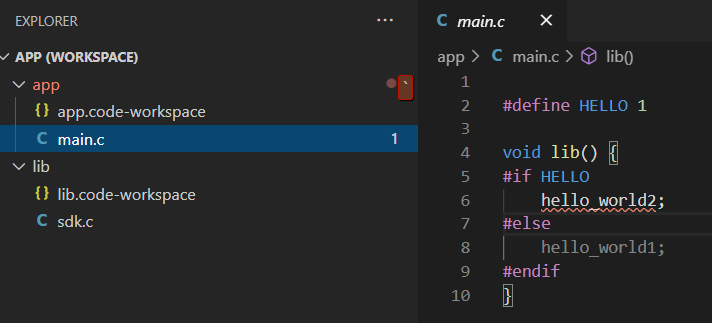
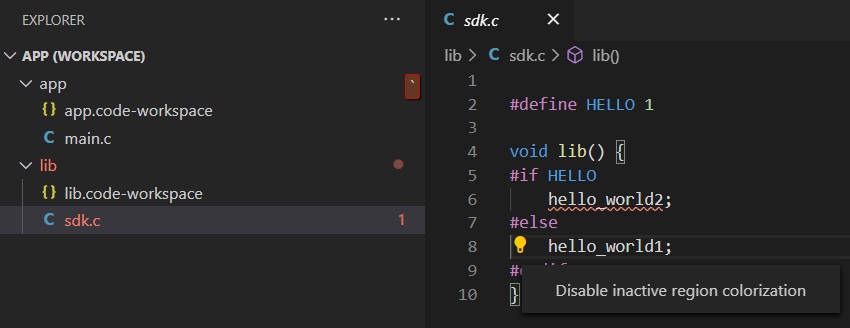
You can see above that main.c has the dimmed text in the correct place.
However, the SDK file doesn't have any dimmed text. It really does believe it's dimmed, as you can see by the hint I'm given.
Steps to reproduce
This is the text I used in both of my C files:
Expected behavior
Inactive region dimming should be active for both files.
Logs
Additional context
I also notice that using a macro comment (like #if 0) causes both files to display green comment text for the disabled area, but only the file in the root folder is dimmed.