

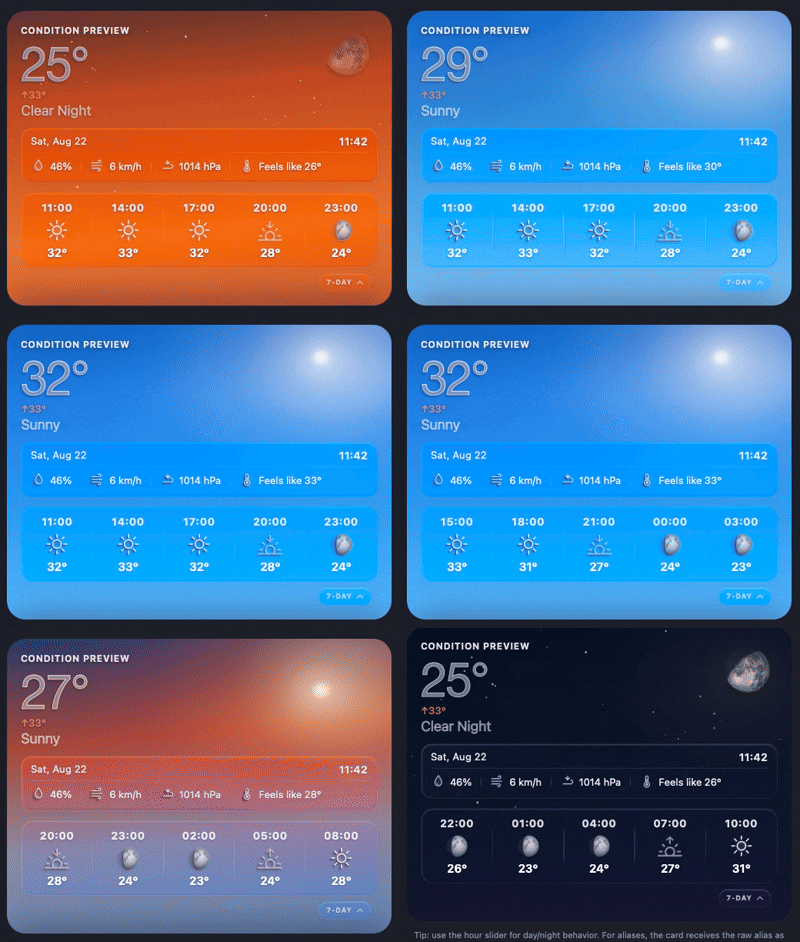
A beautiful, Apple Weather‑inspired custom card for Home Assistant with multi-source weather tabs, smooth particle effects, dynamic backgrounds, and detailed moon phase support.
🔗 GitHub: https://github.com/maxfok/nimbus-weather-card
📦 HACS: Available in HACS
v2.5.1 is a documentation-only hotfix that refreshes the HACS README demo GIF.
v2.5.0 brings the Nimbus Weather Card's source-aware weather experience, clock controls, lunar atmosphere, and motion controls into one public release.
- Configure an optional IANA time zone globally or per weather source.
- Source-local time now drives the optional clock, hourly forecast start, daily range, and solar/lunar context, with safe fallback to the browser time zone.
- Source locations can provide precise solar and lunar context without changing forecast data semantics.
- The hero moon, forecast moons, and night sky use the same continuous astronomical phase model.
- Moonlight, bloom, and clear-night sky treatment transition smoothly through the evening and preserve hemisphere-aware orientation.
- Choose automatic, rounded, or square corners; automatic mode recognises Fully Kiosk only through its official interface.
- The editor supports richer local-station source configuration, including source display options and time-zone selection.
- The Animations control reliably pauses weather motion while retaining a static lightning bolt and the correct cloud state.
- Forecast subscriptions are isolated per active source and stale asynchronous subscriptions are cleaned up.
- Temperature conversion and observed daily high/low handling consistently use the active source's units and local day.
- Canvas and UFO animation lifecycles use independent animation-frame handles.
- Multi-source weather tabs – display multiple weather integrations, locations, or local stations in one card
- Redesigned visual editor – configure sources through editor tabs with a live preview that follows the active source
- Stunning visuals – gradient backgrounds, floating particles (rain, snow, fog, clouds, wind, lightning)
- Dynamic day/night – automatically switches between sun/moon, starry sky, and colour‑shifting gradients
- Moon phases – renders realistic waxing/waning moons with a continuous terminator model
- Shooting stars – on clear nights, a random star detaches and streaks across the sky, then fades back in
- Feels‑like temperature – shows apparent temperature when available
- Smart units – automatically converts °C/°F reading native entity attributes
- Multilingual – English, Spanish, German, Dutch (and more via PR!)
- Hourly/Daily forecast toggle – tap the forecast bar to switch view
- Custom tap action – navigate, call-service, url, or more-info
- Clock & date panel – optional, togglable
- HACS compatible – one-click install from HACS
v2.4.2 is a focused polish release for the v2.4.x visual and forecast stack.
It improves the daily high/low display, brings forecast moon icons visually closer to the large moon, and refines the aurora effect into a softer two-layer curtain with green and cyan light.
- Daily high/low values are now stabilized from the daily forecast range seen during the day.
- Nimbus keeps the widest valid daily forecast range it has seen for the active source/date, instead of letting the low follow the current or remaining hourly forecast.
- Temporary invalid restart/update ranges such as
27° / 27°are ignored when better daily data is already available.
- Forecast and modal moon icons now use a grey moon palette to better match the large moon rendering.
- The existing phase/terminator mechanism remains unchanged, so the icons keep the same phase logic while looking less yellow.
- Aurora rendering has been reworked into a layered cyan-and-green curtain.
- The effect now sits slightly higher in the sky and uses a larger curved motion inspired by the earlier v2.3.3 aurora flow.
- Pink/purple mass has been removed in favour of cyan, tea-mint, and aurora-green blending.
v2.4.1 is a small but important visual and reliability hotfix after the v2.4.0 multi-source release.
It tightens condition handling across weather integrations and local condition sensors, fixes fog rendering artifacts, and corrects night backgrounds for edge-case states such as overcast and exceptional.
- Weather states are now normalized before rendering, so common variants such as
Partly Cloudy,partly-cloudy,clear night,mist,haze,drizzle,heavy-rain,thunderstorm,snow,sleet, andwintry-mixmap to the intended Nimbus visuals. overcastnow uses the cloudy icon instead of falling back to the exceptional warning icon.overcastandexceptionalnow have proper night background handling in both CSS and canvas rendering paths.- Moon visibility is reduced for heavy/uncertain conditions such as
overcast,exceptional, andlightning, so the moon no longer appears too clear through dense cloud or warning states.
- Fog rendering no longer uses visible rectangular/horizontal bands.
- Mist layers now render as softer radial veils with feathered edges for a more natural diffuse fog effect.
- The
exceptionalwarning icon has been refined with a more balanced isosceles triangle and clearer centered mark.
What started as another round of visual polish grew into a much deeper update. Nimbus can now handle multiple weather sources, keep local station data separate from forecast integrations, and render the sky with smoother transitions, improved moon phases, softer clouds, and richer atmospheric effects.
The result is a more flexible card with better support for mixed weather sources and a more polished visual experience.
Nimbus Weather Card can now display multiple weather sources as tabs above the card. You can combine multiple weather integrations, multiple locations from supported integrations, a local weather station as its own source, and supplementary sensors for details missing from a forecast integration.
Each source can define its own name, weather entity, forecast type, display options, and optional sensors for humidity, wind, precipitation, pressure, UV index, feels-like temperature, and weather condition.
Existing single-entity configurations continue to work without changes.
The editor now includes a dedicated Weather Sources section. Sources are managed through tabs, matching the way they appear on the card. The preview automatically follows the selected source, making multi-source configuration easier to understand.
Per-source options include forecast type, maximum forecast items, 24-hour time format, forecast strip visibility, detail visibility, clock visibility, and wind speed unit.
Local weather station data can now coexist with forecast integrations instead of only overriding the primary weather entity.
This is useful when an integration provides the forecast while local sensors provide more accurate conditions for your home, garden, balcony, or other nearby locations.
Moon rendering now uses a continuous terminator model instead of the previous discrete phase mask and offset approach.
The illuminated edge follows the calculated phase fraction, producing more accurate crescents, quarters, and gibbous phases with smoother transitions. The large moon is rendered using a canvas-based texture and phase composite with cleaner disk masking, softer terminator feathering, and more consistent illumination.
Forecast and modal moon icons now use the same phase calculation as the large moon.
The sky renderer has been refined across the day/night cycle, with smoother sunrise continuity, sunset transitions, twilight gradients, astronomical night, deep-night blue balance, and sun/moon cross-fade timing.
Aurora rendering now supports both Arctic and Antarctic latitude zones, including Aurora Australis for southern hemisphere configurations using a softer green, teal, and mint colour palette.
Cloud rendering has also been improved, especially on mobile and simplified rendering paths. Procedural clouds now use more natural variation in shape, timing, opacity, movement, and spacing.
Lens flares are now limited to sunny conditions and peak near solar noon. Their intensity has also been reduced so they complement the sun instead of dominating the scene.
- Daily high/low temperature handling no longer derives the daily low from the current or hourly temperature.
- Temporary invalid daily forecast ranges after Home Assistant restarts or updates are ignored.
- Unknown or unavailable supplemental sensor states are ignored to prevent invalid
NaNvalues from appearing in the card. - The active weather source is preserved after dashboard refresh whenever possible.
- More Info opens the currently active source instead of always opening the first weather entity.
- The editor preview follows the source currently being edited.
- Card picker metadata has been updated for improved Home Assistant discovery.
This release focuses on atmosphere, smoother transitions, and a more polished forecast modal experience.
Sky gradients now transition with a slow 3-minute cross-fade instead of an abrupt change. Sunrise, golden hour, daytime, and night phases blend naturally as sun elevation changes. The card also schedules a refresh around key sun-elevation thresholds so the sky updates at the right moment.
Clear nights in the Arctic latitude zone can show a soft aurora overlay with layered green, blue, and purple ribbons. Enabled via latitude_zone: arctic in your card config.
type: custom:nimbus-weather-card
entity: weather.home
latitude_zone: arcticThunderstorm conditions now include a sky-flash overlay that briefly illuminates clouds, rain, and droplets. Bolt and flash fading is slower and the secondary flash delay is longer, so strikes feel more natural.
- Haptic feedback on open/close
- Tap backdrop to close
- Swipe down from handle to close
- Escape key support on desktop
- Improved accessibility (
role="dialog",aria-modal,aria-hidden) - Larger modal handle
- Better mobile gesture handling (no background scroll bleed)
On clear nights, a random star detaches and streaks diagonally across the sky every 4–14 seconds, then fades back into place.
- Refined night gradient colour
- Improved layer ordering for backgrounds, aurora, effects, lightning, droplets, and content
- Moon remains visible when condition is explicitly
clear-night - Internal timer cleanup when card is removed or rebuilt
- Removed leftover debug logs
- 📖 Documentation-only hotfix — refreshed the HACS README demo GIF
- 🗺️ Source-local IANA time zones and optional exact source locations for the clock, forecast context, and sky calculations
- 🌙 Unified astronomical moon phase and lunar-atmosphere rendering across hero and forecast views
- 🎛️ Corner-style choices, richer local-station editor controls, and reliable animation pausing
- 🔧 Source-safe forecast subscriptions, active-source temperature units, daily range handling, and independent animation cleanup
- 🌡️ Stable daily range — daily high/low now preserves the widest valid daily forecast range seen for the source/date instead of following current or remaining hourly temperatures
- 🌙 Grey moon forecast icons — forecast and modal moon icons now better match the large grey moon while keeping the existing phase/terminator logic
- 🌌 Aurora curtain polish — reworked aurora into a higher cyan/green layered curtain with larger curved motion and no pink/purple mass
- 🐛 Restart range guard — temporary invalid daily ranges during Home Assistant restarts/updates are ignored when stable daily data is already available
- 🐛 Condition normalization — common condition sensor variants now map to the intended Nimbus weather states
- 🐛 Overcast icon fallback —
overcastnow uses the cloudy icon instead of the exceptional warning icon - 🐛 Night background fixes —
overcastandexceptionalno longer fall back to the bright default canvas background at night - 🌙 Condition-aware moon opacity — the moon is dimmer behind overcast, exceptional, and lightning conditions
- 🌫️ Fog rendering polish — replaced visible horizontal fog bands with softer radial mist veils
⚠️ Exceptional icon polish — refined the warning triangle shape for better balance at small sizes
- ✨ Multi-source weather tabs — display multiple weather integrations, multiple locations, or local stations from one card
- ✨ Redesigned source editor — configure sources through tabs with a preview that follows the active source
- ✨ Per-source options — forecast type, max items, 24-hour time, forecast strip, details, clock, and wind unit can now vary by source
- ✨ Local weather station as a source — local sensors can coexist with forecast integrations instead of only overriding them
- 🌙 Continuous moon terminator — replaces the older mask/offset approach with smoother and more accurate phase rendering
- 🌅 Smoother sky transitions — improved sunrise, sunset, twilight, astronomical night, and sun/moon cross-fade behaviour
- 🌌 Aurora Australis — Antarctic latitude zones now get a southern aurora treatment alongside Arctic aurora support
- ☁️ Improved clouds — more natural mobile/procedural clouds and adjusted desktop streams
- ☀️ Refined lens flares — visible only in sunny conditions and strongest near solar noon
- 🌡️ Daily high/low fixes — daily lows no longer follow current/hourly temperature, and invalid restart ranges are ignored
- 🐛 Unknown sensor guard — unavailable supplemental sensors no longer produce
NaNvalues - 🐛 Interaction fixes — active source persistence, More Info for the selected source, and editor preview source syncing
- 🔧 Card picker metadata — updated Home Assistant discovery information
- ✨ Slow background cross-fade — sky gradients blend over ~3 minutes between elevation zones
- ✨ Aurora Borealis — soft aurora overlay for
latitude_zone: arcticon clear nights - ✨ Lightning flash effect — sky illumination during thunderstorms, slower/more natural timing
- ✨ Forecast modal polish — haptic feedback, swipe-to-close, backdrop tap, Escape key, accessibility improvements
- ✨ Shooting stars — existing stars detach, streak, and fade back in on clear nights
- 🐛 Moon remains visible when condition is explicitly
clear-night - 🔧 Internal timer cleanup, improved layer ordering, removed debug logs
- New multi-phase sky gradient system with smooth colour interpolation
- 7 elevation zones: deep night → nautical dawn → blue hour → sunrise/sunset → golden hour → morning → daytime → midday
- Extended sun elevation range to −30°..90°
- Moon auto-detected from
sensor.moon_phase(no config needed) - Moon fixed to top-right corner — no longer goes offscreen on short cards
- More precise phase calculation using UTC time
- Tap the forecast bar to swap between daily ↔ hourly view
tap_actionsupport: More Info, Navigate, Open URL, None
- Dedicated mobile cloud rendering for sharper display on touch devices
- Better cloud detection for rainy, pouring, snowy-rainy conditions
- Redesigned icon matching the style of humidity, wind and pressure icons
- High/Low always shows daily values even when hourly forecast is selected
clear-nightcondition now correctly shows sun icon during daytime (fixes KNMI / NL Weather integration)
- ✨ Multilingual support — English, Spanish, German (thanks u/R3x10 & u/super-gando!)
- ✨ Language selector in card editor
- 🐛 Fix: HACS update notifications now work correctly (missing
filenamein hacs.json) - 🐛 Fix: Forecast icons correctly show day/night per hour (no more moon at 1pm!)
- 🐛 Fix: Sun entity takes priority over weather state for day/night detection
- ✨ Animated rain with wind skew (based on
wind_bearing) - ✨ Glass window droplets for rainy conditions
- ✨ SVG cloud layers with per-condition opacity
- ✨ Snow animation with 3-layer canvas and sine-wave sway
- ✨ Lightning with midpoint-displacement branching bolt algorithm
- ✨ Autumn leaf gusts for windy conditions
- ✨ Dynamic solar gradient based on
sun.sunelevation - ✨ NASA moon texture with full 8-phase rendering
- ✨ Moon hemisphere rotation based on latitude
- Open HACS → Frontend
- Search for Nimbus Weather Card
- Click Download
- Refresh your browser after installation
- Download
nimbus-weather-card.js - Copy to
/config/www/nimbus-weather-card.js - Add as a custom resource:
Settings → Dashboards → Resources → Add- URL:
/local/nimbus-weather-card.js - Type: JavaScript module
- URL:
type: custom:nimbus-weather-card
entity: weather.forecast_home
sun_entity: sun.sun          # optional but recommended
moon_entity: sensor.moon     # optional, for moon phases
language: en                 # en | es | de | nl
show_clock: true             # optional clock/date panel
tap_action:
  action: navigate
navigation_path: /lovelace/weather| Option | Default | Description |
|---|---|---|
entity |
required | Your weather entity |
sun_entity |
sun.sun |
For accurate day/night detection |
moon_entity |
— | Moon phase sensor |
language |
en |
en, es, de, nl |
show_clock |
false |
Show clock & date panel |
show_details |
true |
Show humidity, wind, pressure |
tap_action |
more-info | Standard HA tap action |
ufo_easter_egg |
false |
🛸 You'll know when you see it |
latitude_zone |
— | arctic for aurora borealis on clear nights |
Translations are just a few lines of JSON. Open a Pull Request!
See existing translations in the source for the format.
Open an issue on GitHub or comment on the HA Community thread.
If you like Nimbus, consider giving it a ⭐ on GitHub!