Contributors: johanneswk, kanru
Tags: cloudflare, jwt, login, sso, composer
Requires at least: WordPress 6.3 (full PHP 8.0 support)
Tested up to: 6.9
Requires PHP: 8.0
Stable tag: 2.1.3
License: GPL-2.0+
License URI: http://www.gnu.org/licenses/gpl-2.0.txt
A simple way to allow single sign-on to your WordPress site when using Cloudflare Access.
Enable Cloudflare Access self-hosted application to protect your /wp-admin folder. Add your auth domain and aud settings from Cloudflare Access. Authenticated users will be automatically logged in to WordPress if their email address matches.
Follow Cloudflare documentation to set up Access.
You can also define configs in wp-config.php:
define('WP_CF_ACCESS_AUTH_DOMAIN', 'yourdomain.cloudflareaccess.com');
define('WP_CF_ACCESS_JWT_AUD', 'examplef2nat0rkar2866wn829a0x2ztdg');
define('WP_CF_ACCESS_REDIRECT_LOGIN', true);
This plugin is not affiliated with nor developed by Cloudflare. All trademarks, service marks and company names are the property of their respective owners.
The plugin settings page allows you to configure your Cloudflare Access credentials and enable debug mode for troubleshooting:
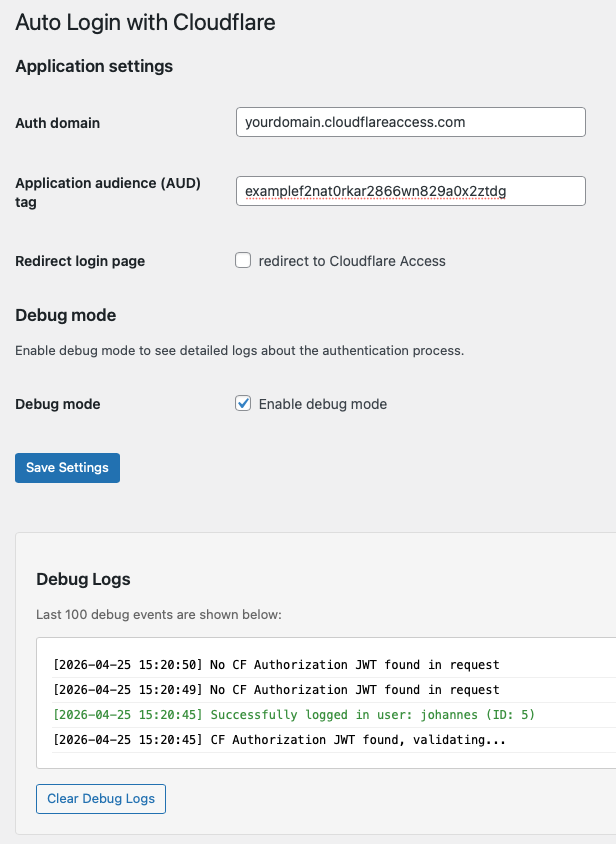
Features shown:
- Auth domain configuration
- Application audience (AUD) tag from Cloudflare
- Redirect login page option
- Debug mode toggle with real-time log display
The plugin includes a built-in debug mode to help troubleshoot authentication issues.
- Go to Settings → Auto Login with Cloudflare
- Check the "Enable debug mode" checkbox
- Click "Save Settings"
Debug logs appear on the settings page in a scrollable box with color-coded messages:
- 🔴 Red: Errors and failed validations
- 🟢 Green: Successful login
- 🔵 Blue: User already logged in
- ⚫ Black: Informational messages
Enable the "Redirect login page" option and all future logins will be redirected to /wp-admin and trigger Access authentication.
The option assumes that the /wp-admin folder is protected by Cloudflare Access. If the folder is not protected, then auto-login will fail and redirect back to the login page, causing the redirect loop.
You can download the latest .zip from the GitHub releases page and upload it via the WordPress plugin installer. No Composer required for end users.
- Security: Remove spoofable CF-Ray header origin check — JWT signature validation is the actual security control
- Performance: Drastically reduce database writes by buffering debug logs
- Fix: Remove dead exp/nbf validation code after JWT::decode() (firebase/php-jwt already validates these)
- Improve: Use consistent JWT leeway (5 seconds) for all time-based validations
- Improve: Restore cookie fallback for JWT tokens — prefer header but accept cookie for atypical setups
- Improve: Sanitize HTTP_CF_CONNECTING_IP before storage to prevent injection
- Simplify: Remove redundant 24-hour token age check (Cloudflare tokens expire in 20 minutes anyway)
- Refactor: Cleaner, more maintainable validation code with reduced complexity
- Feature: Add built-in debug mode with real-time log display on settings page (works independently of WordPress WP_DEBUG)
- Security: Enforce RS256 algorithm validation to prevent algorithm downgrade attacks
- Security: Remove unsafe fallback key loop - now requires strict kid (key ID) matching per JWT spec
- Security: Improved JWT validation error logging for better security auditing with detailed failure reasons
- Improve: Move login hook to
wp_loadedfor better WordPress initialization compatibility - Improve: Execute auth actions directly instead of deferring to separate hook (more reliable)
- Improve: Color-coded debug logs (red for errors, green for success, blue for already logged in)
- Improve: Refactored code for simplicity and maintainability (reduced file size by ~30%)
- Consolidated config getter functions into single helper
- Extracted JWT validation into dedicated function
- Simplified error handling and flow control
- Removed unused constants and variables
- Replaced standalone functions with anonymous hooks
- Upgrade to firebase/php-jwt v7.0.5 with enhanced security (key size validation, stricter payload validation)
- Fix: RFC 4648-compliant base64url padding for proper JWT header decoding in PHP 8+
- Improve: Enhanced JWT decode error handling with defensive null checks and better fallback logic
- Improve: Added detailed error logging for JWT validation failures and format issues
- Improve: Support for v7's stricter key validation with graceful fallback to alternative keys
- Fix JWKS validation and error handling in refresh_keys() and login() functions to prevent TypeError and improve debugging.
- Security: Improved JWT validation by checking the
iss(issuer) claim against your Cloudflare Access team domain. - Security: Now supports JWTs provided via the
Cf-Access-Jwt-AssertionHTTP header as well as theCF_Authorizationcookie, following Cloudflare best practices.
- This release marks the start of maintenance under a new fork by Johannes Kistemaker, based on the original plugin by Kan-Ru Chen.
- Add support for php-jwt v6.11.x and Composer-based dependency management
- Fix error on plugin activation with php-jwt v6+ by switching to Composer autoloading
- Improve error handling and settings page accessibility
- Remove legacy git submodule and cog.toml/manifest.txt files
- Remove "Buy me a coffee" link from plugin actions
- Update plugin metadata: author, links, and version
- Update namespace and codebase for clarity and maintainability
- Clean up unused code and improve code consistency
- Update documentation and changelog to reflect new fork and maintenance
- Add GitHub Actions autobuild: automatically creates a prerelease zip archive (
auto-login-with-cloudflare-{version}.zip) and GitHub release on every push for easier testing and installation
- Fix redirect issue for non-default wp-admin urls
- Tested with WordPress 6.1.1
- Tested with WordPress 5.9
- Fixed errors when activated in multi-site enabled installation
- Show an error message when user does not exist to prevent redirect loop
- Tested with WordPress 5.8
- Update php-jwt to 5.4
- Stable. No major change planned
- Tested with WordPress 5.7
- Update minimum requirements
- Update php-jwt to 5.2.1
- First beta release.