Inline Studio is a free, open-source desktop app for AI filmmakers. Build a whole visual pipeline on a free-form node canvas, from moodboard to final cut, with hosted models via fal (bring your own key) for instant creative range and your own ComfyUI for infinite control.




New here? Check out our getting started guide →
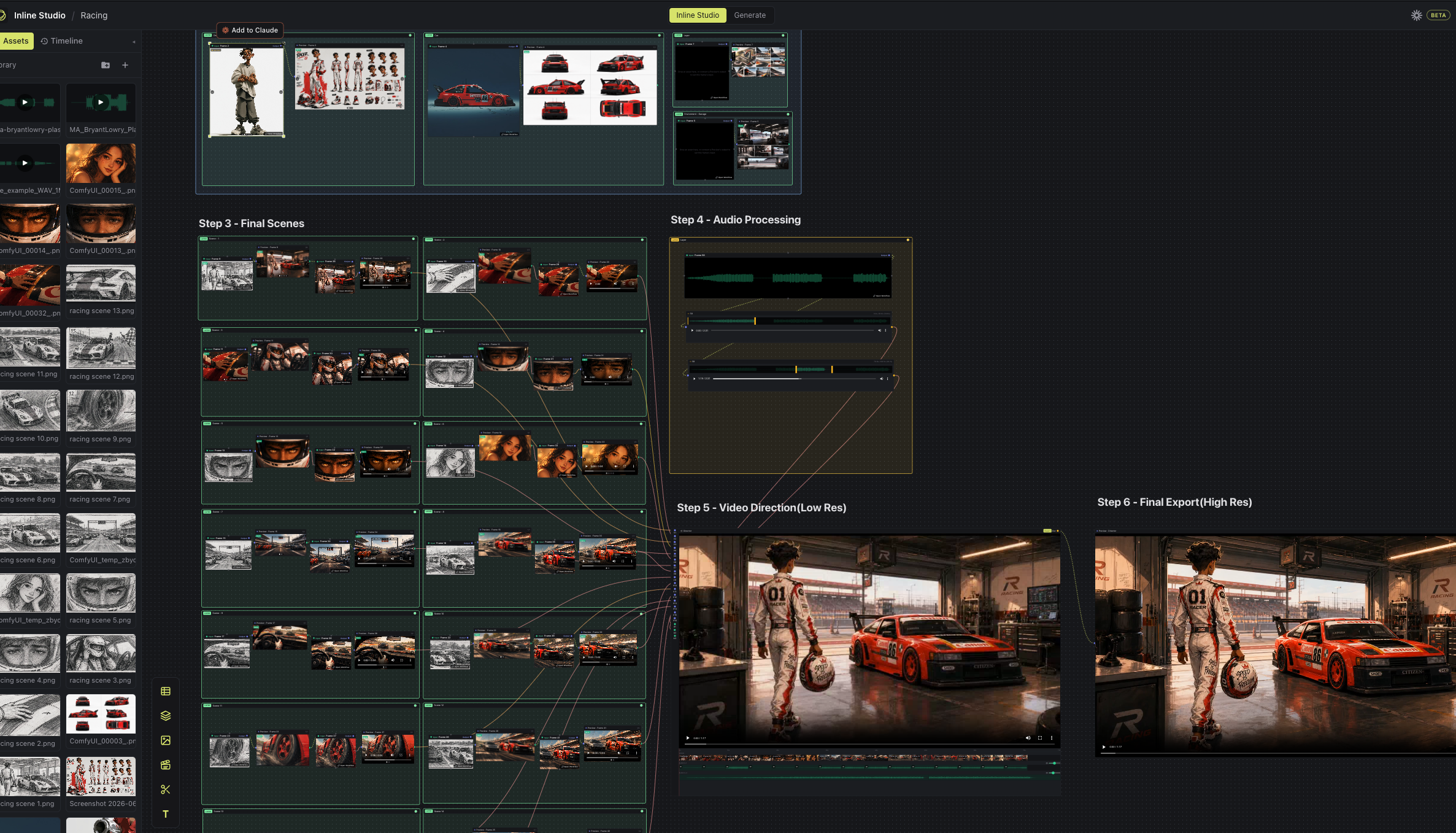
Inline Studio is a free, open-source desktop app for AI filmmaking on a node canvas, powered by hosted fal models and your own ComfyUI. It gives AI filmmakers a free-form canvas to build a whole visual pipeline, from moodboard to final cut, where every render is kept as a versioned, non-destructive take. Reach for fal when you want instant creative range: hosted closed models like GPT2 Image, Nano Banana, Seedance & many more, no setup and no GPU. Reach for your own ComfyUI when you want infinite control over nodes, models, and the render. Mix both in the same film, and Inline Studio handles everything around the render: exploring options, keeping what works, and shaping a repeatable process you can iterate on and share.
Who it's for: AI filmmakers, motion artists, and generative creators who want to make AI short films and longer cuts with ComfyUI without losing every good version along the way.
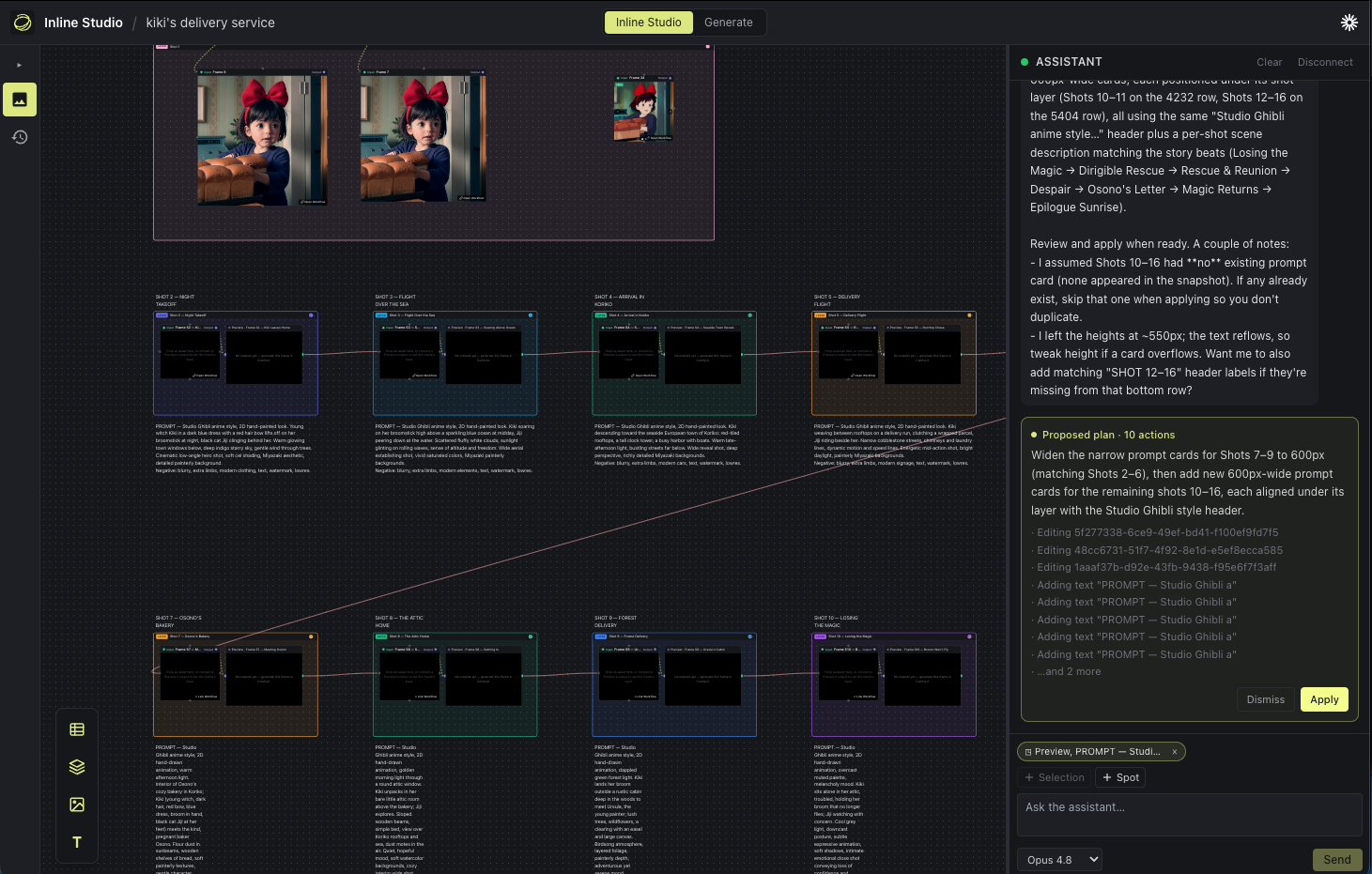
- Free-form node canvas - lay out your whole AI film like a mood board that can actually generate. Marquee-select, copy/paste, undo/redo, layers, and text notes all work the way your hands expect.
- Versioned, non-destructive takes - every render is kept. Generating again adds a new take; nothing is overwritten. Star the keeper and it flows downstream.
- Chain frames into a generative pipeline - wire one frame's output into the next frame's input. Refine a shot, feed it forward, regenerate the source, and everything downstream follows.
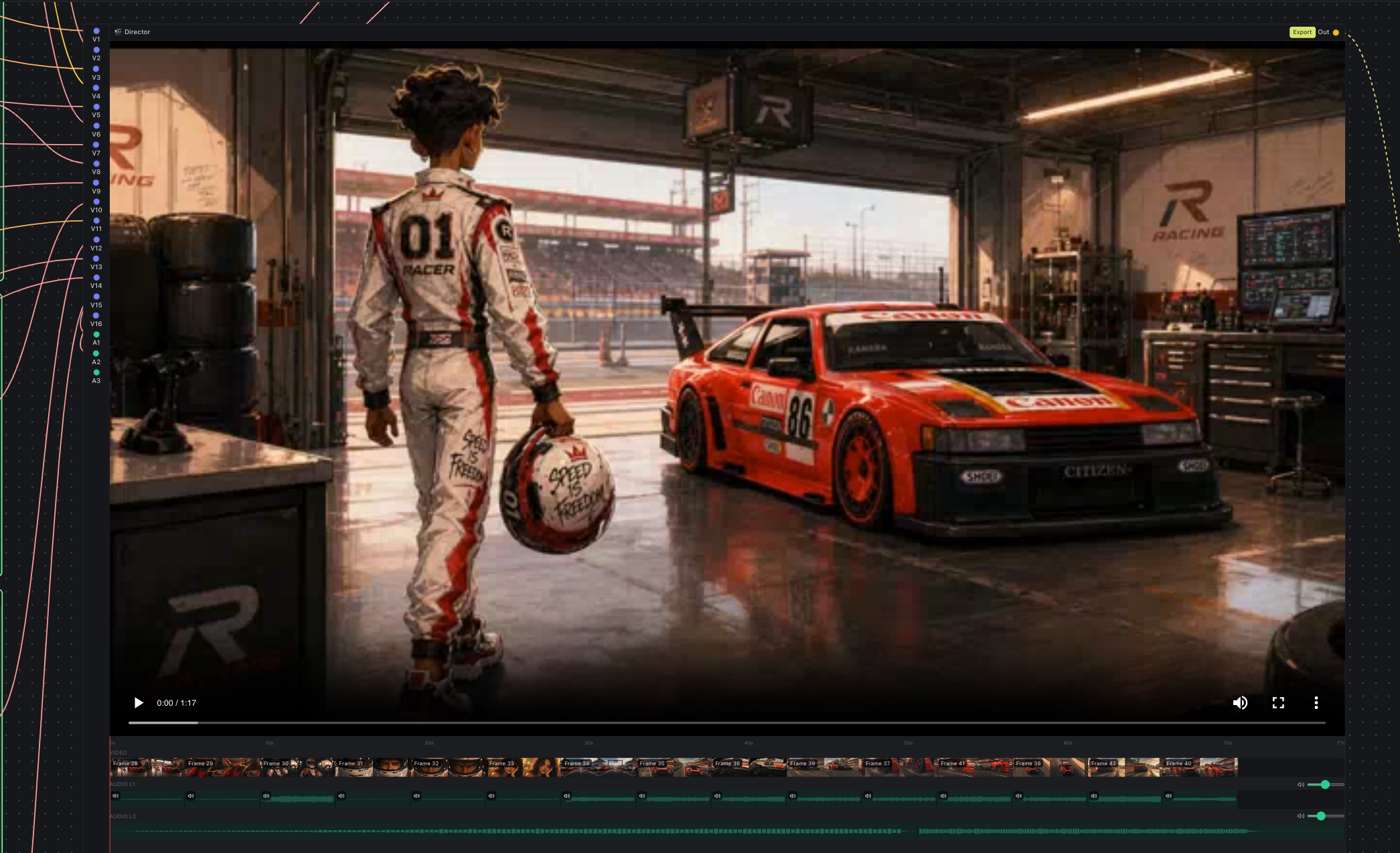
- Video Director node - a timeline-in-a-node that assembles your rendered frames into a single cut, with layered audio (the videos' own audio plus your own music/VO), per-input and per-layer volume, an in-node preview to scrub, and high-res export.
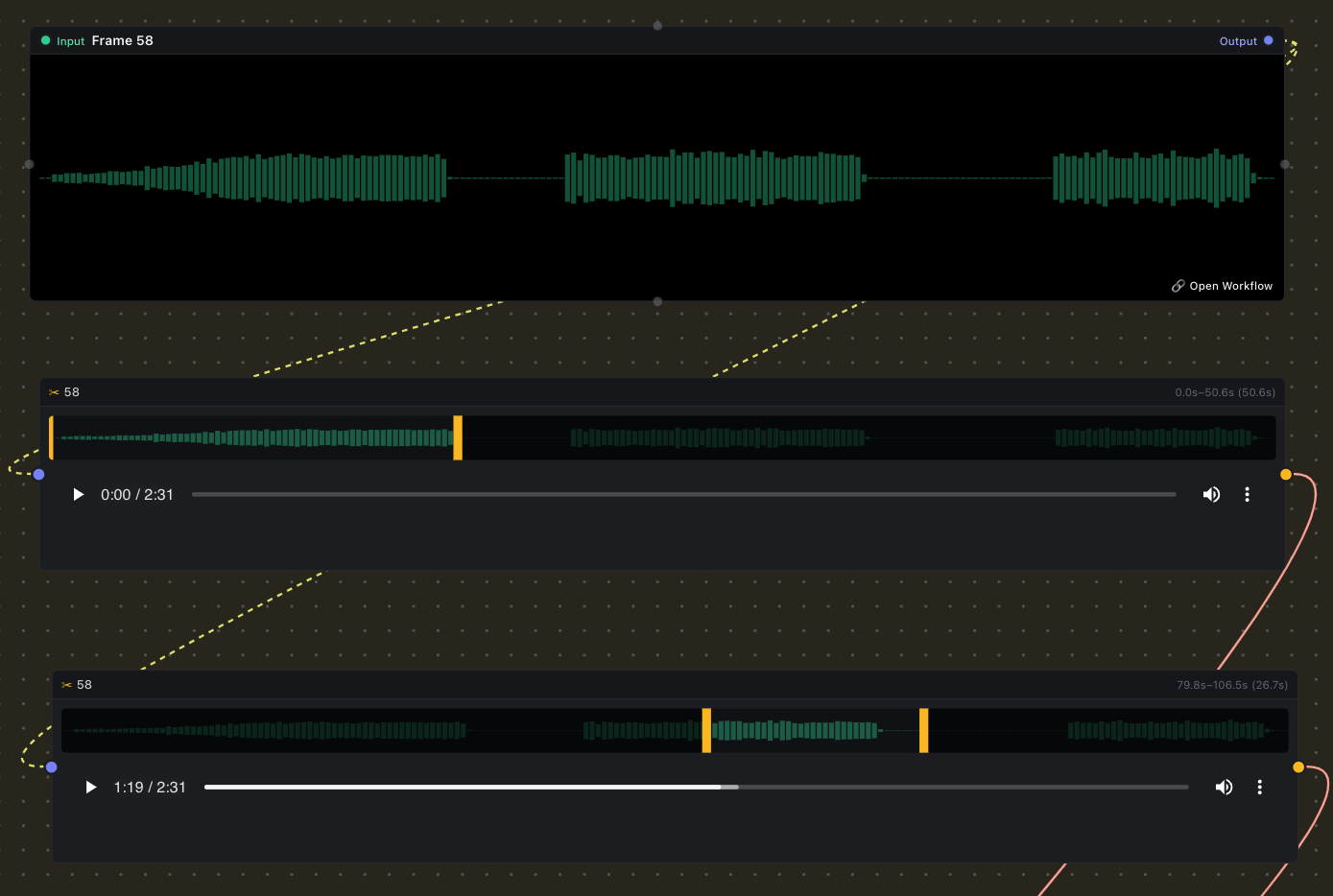
- Trim Video/Audio node - drop in a clip, drag the in/out handles over its filmstrip/waveform, and pass just the trimmed segment downstream.
- Generate with closed models, no setup - run hosted models like GPT Image 2, Nano Banana, Seedance, Krea, and LTX right on the canvas. No ComfyUI, no custom nodes, no GPU. Add a Generate node, pick a model, and bring your own fal.ai key.
- Bring your own ComfyUI - connect any ComfyUI instance, local or cloud. Your media, your models, your machine.
- Free & open source (MIT) and cross-platform - macOS (Apple Silicon & Intel), Windows, and Linux.
| Trim Video/Audio node | Video Director node |
|---|---|
 |
 |
Follow our Animated Short Film with LTX 2.3 and GPT Image Generation tutorial →
ComfyUI is the most capable generative engine going - image, video, audio, LLM, every new model lands there first. But generating is the easy part. The work that makes an AI film is what comes after: exploring options, keeping what's good, and shaping a repeatable process out of it. Inline Studio is the layer where that happens, organised around one model:
From the home screen, Export zips a project into one archive. Import it on the other side and you get everything back: the inputs (every imported asset), the outputs (all the generated takes), and the ComfyUI workflows that turned one into the other. Whoever opens it can re-run the pipeline exactly and keep iterating.
Inline Studio doesn't bundle or manage ComfyUI - you bring your own, run it wherever you like, and point Inline Studio at it. This keeps you in full control of your nodes, models, and the render.
- Running locally with a GPU? Start ComfyUI with
--enable-cors-headerand paste its address into the Generate tab. - No GPU? Spin up ComfyUI on a cloud GPU - the app walks you through deploying it on RunPod - and paste the public URL. Any reachable ComfyUI works.
Your media, your models, your machine. ComfyUI does the rendering. Inline Studio gives the work a shape you can iterate and share.
Not every model lives in ComfyUI. The best closed models are hosted only, and standing up a workflow just to try one is friction you don't need. Inline Studio adds a second way to generate: a single Generate node that runs hosted models through fal, with no ComfyUI, no custom nodes, and no GPU.
Create a frame, choose Start with Fal API, pick a model, and run. Everything else works exactly as it does with ComfyUI: takes, flow links between frames, the Video Director, and export. That means you can mix hosted models and your own ComfyUI renders in the same film.
Models available today:
- Image: GPT Image 2, Nano Banana 2, Nano Banana Pro (edit), Krea v2 Large
- Video: LTX 2.3 (image to video), Seedance 2.0 (text, image, and reference to video)
It is bring your own key. Add your fal.ai API key in Settings and it stays on your machine, sent only to fal when you generate. You pay fal directly for what you render, and each node shows a rough price estimate before you run it.
Grab a prebuilt installer from the latest release and open it:
- macOS: download the
.dmgfor your chip -arm64for Apple Silicon (M1/M2/M3…),x64for Intel Macs - open it, and drag Inline Studio into Applications. - Windows: download the
-setup.exeand run it. - Linux: download the
.AppImage, make it executable (chmod +x Inline Studio*.AppImage), and run it.
The builds are currently unsigned, so on first launch your system may warn about an unidentified developer:
- macOS: right-click the app and choose Open, then Open again. If it says the app is "damaged", run
xattr -dr com.apple.quarantine /Applications/Inline Studio.app. - Windows: on the SmartScreen prompt, click "More info" then "Run anyway".
To actually generate, you'll also need a ComfyUI instance to connect to (see Bring your own ComfyUI). The canvas and planning work without it.
New to Inline Studio? The Getting Started guide walks you through your first render.
Prefer to run from source? You'll need Node.js 20.11+ (22 recommended).
git clone <this-repo>
cd inline-studio
npm install      # also rebuilds the native SQLite module for Electron
npm run dev      # launches the app with hot-reload
To generate, start ComfyUI with CORS enabled and connect it on the Generate tab:
python main.py --enable-cors-header # then paste http://127.0.0.1:8188 in-appOn macOS sandboxes that set
ELECTRON_RUN_AS_NODE=1, launch withenv -u ELECTRON_RUN_AS_NODE npm run dev.
To produce an installer you can hand to someone, package it for your platform:
npm run package:mac      # arm64 + x64 .dmg in dist/
npm run package:win      # NSIS .exe installer in dist/
npm run package:linux    # AppImage in dist/
A few things to know:
- Build each OS - and each Mac arch - on matching hardware. Inline Studio ships a native module (SQLite), which has to be compiled for the target machine, so build the Mac app on a Mac and the Windows app on Windows. The same applies to Mac CPU arch: an Intel (
x64) dmg has to be built on an Intel Mac and an Apple Silicon (arm64) dmg on an Apple Silicon Mac - cross-building bundles the wrong native binary. CI handles this for you (see below). - After packaging,
npm run devmay complain about the native module. Packaging rebuilds SQLite for the target architecture; runnpm run rebuildto restore it for local development. - The builds are unsigned. On first launch macOS and Windows will warn about an unidentified developer. On a Mac, right-click the app and choose Open (or remove the quarantine flag with
xattr -dr com.apple.quarantine /Applications/Inline Studio.app). For real distribution you'll want code signing and notarization. - App icon. The icon lives in
build/(icon.pngis the source). Replace it there and re-package to rebrand.
Releases are automated: bump the version in package.json and run the Build & Release workflow from the Actions tab. It builds installers for macOS (Apple Silicon and Intel - each on its own runner), Windows, and Linux on GitHub Actions and uploads them to a draft GitHub Release.
Yes. Inline Studio is free and open source under the MIT license. There's no paid tier to use the app.
Not on the machine running Inline Studio. ComfyUI does the rendering, so you only need a GPU wherever ComfyUI runs - that can be a local GPU on the same machine, or a cloud GPU you connect to. Inline Studio's canvas and planning work without any GPU at all.
No - you bring your own ComfyUI. Inline Studio doesn't bundle or manage it. Start ComfyUI with CORS enabled (python main.py --enable-cors-header) and paste its address into the Generate tab, or point Inline Studio at a cloud ComfyUI instance by pasting its public URL. Any reachable ComfyUI works.
Through your own ComfyUI. Connect an existing setup or launch one on a cloud GPU via RunPod - the app walks you through it - and you keep full control of ComfyUI: its nodes, custom nodes, and models are all yours. The Generate tab embeds the full ComfyUI node graph, so everything you'd do in ComfyUI directly is available inside Inline Studio.
Inline Studio is early and moving fast, any issues, ideas, and pull requests are all welcome. If you're poking at the code, CLAUDE.md is the engineering guide: it explains the architecture, the data model, and the conventions to follow.
Want to help by using it for real? Try the creator task: build a short 20-second AI film in Inline Studio and send us your feedback.
Are you an AI filmmaker who wants to help us make this better? We run a paid trial feedback program: use Inline Studio on real work, tell us what helps and what gets in your way, and get paid for your time.
Come say hi on our Discord and reach out, we'll get you set up.
MIT.