I am making a web application that will be presented on a large multitouch TV screen. It is going to be multi-user, so we are planning on having multiple keyboards open--one for each user. Here is a mockup of our interface:
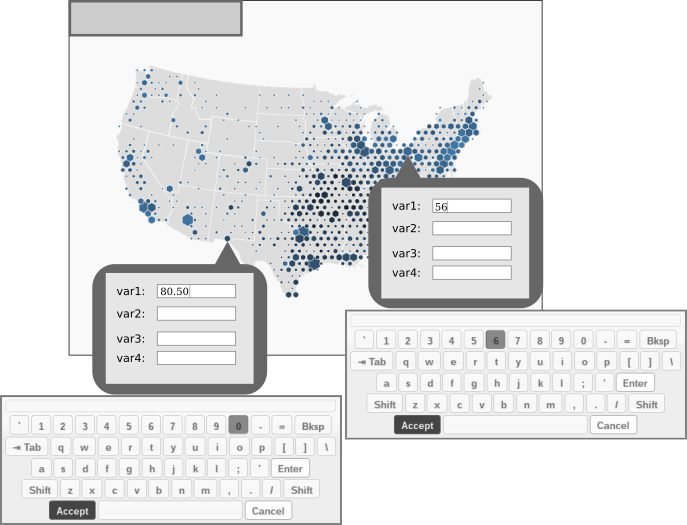
As you can see, two users are entering data simultaneously. Each user is editing a text field with a virtual keyboard bound to it.
Ideally, we would like every keyboard to stay open until the user presses accept or cancel, but the stayOpen property doesn't behave that way. It does not allow more than one keyboard at a time. Another possibility we are exploring is using the alwaysOpen property. We are thinking about toggling alwaysOpen on when we need the keyboard and off when we don't need it anymore, but I don't see a way to do that when I look through your API.
Is there a way to change the alwaysOpen option after a keyboard has been created? Alternatively, is there a way to hide a keyboard that has is alwaysOpen?
I am making a web application that will be presented on a large multitouch TV screen. It is going to be multi-user, so we are planning on having multiple keyboards open--one for each user. Here is a mockup of our interface:

As you can see, two users are entering data simultaneously. Each user is editing a text field with a virtual keyboard bound to it.
Ideally, we would like every keyboard to stay open until the user presses accept or cancel, but the stayOpen property doesn't behave that way. It does not allow more than one keyboard at a time. Another possibility we are exploring is using the alwaysOpen property. We are thinking about toggling alwaysOpen on when we need the keyboard and off when we don't need it anymore, but I don't see a way to do that when I look through your API.
Is there a way to change the alwaysOpen option after a keyboard has been created? Alternatively, is there a way to hide a keyboard that has is alwaysOpen?