
Malama is a lightweight, private, and fully native desktop interface for chatting with large language models running locally through Ollama.


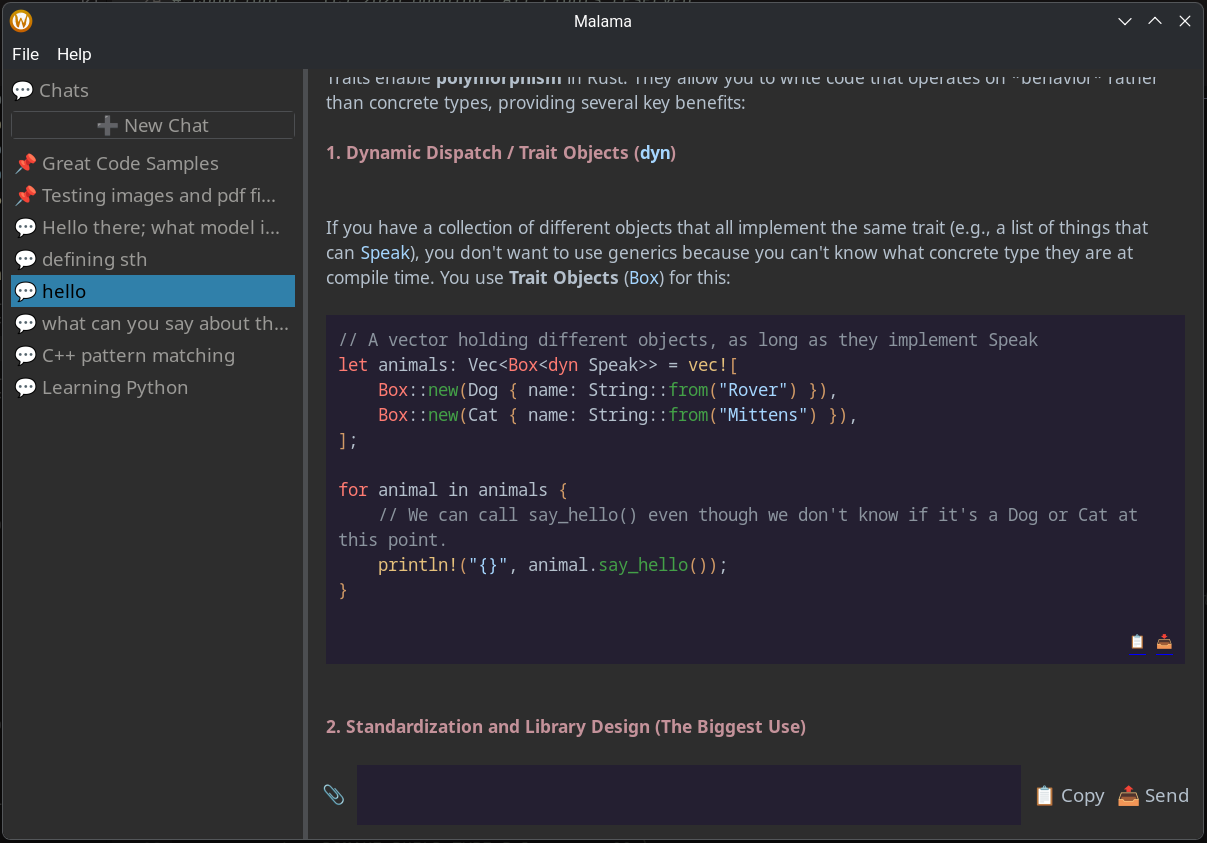
- #overview
- #why-malama
- #whats-new-in-v027-7
- #key-features
- #supported-attachments
- #architecture
- #ingestion-subsystem
- #network-payload-serialization
- #memory-and-style-policy
- #build-requirements
- #setup-guide
- #1-install-ollama
- #2-pull-a-model
- #3-install-build-dependencies
- [4. Clone nd-build-malama
- #5-run-malama
- #usage
- #privacy
- #license
Malama is a lightweight, native Linux desktop chat client built with
C++23 and wxWidgets.
It connects directly to a local Ollama instance over TCP and provides a complete LLM chat workspace without relying on Electron, an embedded browser engine, or an external cloud service.
Malama idles at approximately 40 MB of RAM, leaving more of your system resources available for model inference.
Important
Malama is designed for local inference. Your conversations and attached documents remain on your machine unless your Ollama configuration or selected model explicitly communicates with an external service.
Many desktop AI clients are browser applications packaged as desktop programs. Malama takes a different approach:
- Native Linux interface built with wxWidgets
- Local-first operation through Ollama
- Low memory usage with no Electron runtime
- Persistent conversations stored using SQLite
- Real-time token streaming over asynchronous TCP
- Document and image attachments
- C++23 architecture with explicit ownership and error handling
- No browser or cloud account required
Malama now includes a factory-routed attachment manager capable of processing images, documents, spreadsheets, e-books, and plain-text files.
Supported formats include:
Images:       .png, .jpg, .jpeg, .webp
Documents:    .pdf, .docx, .odt
Spreadsheets: .xlsx, .ods
E-books:      .epub
Text:         .txt, .md
Files can be attached directly to the active conversation before a prompt is submitted.
Extracted document content is enclosed within explicit Markdown context markers:
[START OF CONTEXT DOCUMENT: filename]
Extracted document content
[END OF CONTEXT DOCUMENT: filename]
These boundaries help the model distinguish user instructions from attached reference material.
Ollama commonly uses a smaller default context window. To reduce the likelihood of long documents being silently truncated, Malama's asynchronous request pipeline explicitly sets:
{
  "num_ctx": 32000
}
Note
The effective context capacity still depends on the selected model and the memory available on your system.
Individual image and PDF attachments are subject to a 4 MB processing limit.
This boundary helps protect local systems from excessive RAM or VRAM use, unexpected allocation failures, and oversized document payloads.
Attached files appear in a horizontal staging tray beneath the prompt editor.
Each attachment is represented by a compact chip containing:
- A file-type icon
- The attachment name
- An independent remove button
- Its current staging state
This makes it possible to review and remove individual files before sending the prompt.
Sidebar interaction now uses localized HitTest checks through
wxEVT_MOTION.
Hand cursors and navigation tooltips are displayed only when the pointer is positioned over a valid conversation entry, avoiding inaccurate interactions caused by broad widget-level bounding boxes.
| Feature | Description |
|---|---|
| 🪶 Minimal Footprint | Idles at approximately 20 MB of RAM. System resources remain available for model inference instead of an embedded browser runtime. |
| 🔒 Local-First Operation | Connects directly to a local Ollama instance without requiring a cloud account or browser session. |
| 💾 Persistent Sessions | Stores conversation history locally with SQLite3 and supports pinning, renaming, and deleting sessions. |
| ⚡ Low-Latency Streaming | Uses Boost.Asio for asynchronous TCP communication and real-time token delivery. |
| 🖼️ Multimodal Routing | Validates supported images and prepares Base64 payloads for compatible vision-language models. |
| 📄 Document Extraction | Extracts text from documents, spreadsheets, e-books, markup files, and plain-text assets. |
| ❌ Selective Queue Control | Allows individual attachments to be removed before a request is submitted. |
| 📌 Precise Sidebar Interaction | Uses coordinate-aware hit testing for reliable conversation selection and hover behavior. |
| 📝 Native Markdown Rendering | Includes a native Markdown canvas and JSON-configurable syntax highlighting for languages such as C++, Rust, and Python. |
| 🧠 Reasoning Filter | Optionally removes <think> blocks produced by reasoning-oriented models through a thread-isolated state machine. |
| 🧩 Decoupled Architecture | Separates interface widgets, networking workers, storage repositories, and file parsers into focused components. |
| Category | Formats | Processing Strategy |
|---|---|---|
| Images | PNG, JPEG, JPG, WebP | Validation and Base64 encoding for multimodal models |
| PDF documents | Text extraction through poppler-cpp |
|
| Office documents | DOCX, XLSX | Archive extraction and XML traversal |
| OpenDocument files | ODT, ODS | Archive extraction and XML traversal |
| E-books | EPUB | Archive extraction and structured text traversal |
| Plain text | TXT, MD | Direct UTF-8 text ingestion |
Warning
Image attachments require a model with vision capabilities. A text-only model cannot interpret image payloads.
Malama maintains a clear separation between the user interface, attachment processing, asynchronous networking, persistent storage, and the local model runtime.
┌──────────────────────────────────────────────────────────┐
│                    UI Thread / Main Frame                │
│                                                          │
│   ┌──────────────────────┐   ┌────────────────────────┐   │
│   │   ChatPanel Canvas   │   │  SidebarPanel List     │   │
│   └──────────┬───────────┘   └────────────▲───────────┘   │
└──────────────┼─────────────────────────────┼───────────────┘
               │                             │
        on_send_action()               wxQueueEvent
               │                       token updates
               ▼                             │
┌──────────────────────────┐    ┌────────────┴─────────────┐
│    AttachmentManager     │    │       StreamWorker       │
│                          │    │                          │
│  Factory-routed parsers  │    │  Boost.Asio TCP socket  │
│  libarchive + pugixml    │    │  Glaze JSON processing  │
└─────────────┬────────────┘    └────────────┬─────────────┘
              │                              │
              └───────────┬──────────────────┘
                          │
                  POST /api/chat
                  num_ctx: 32000
                          │
                          ▼
              ┌────────────────────────┐
              │ Local Ollama Instance  │
              └────────────────────────┘
The AttachmentManager acts as the central entry point for file ingestion.
When a file enters the application, its extension is classified and routed to
the appropriate parser through ParserFactory.
Reads UTF-8 text files directly into the reference context.
Supported formats include:
.txt
.md
Uses poppler-cpp to read text from PDF pages while excluding embedded binary
content from the resulting prompt context.
Processes ZIP-based document formats such as:
.docx
.xlsx
.odt
.ods
.epub
ArchiveReader uses libarchive to inspect and extract archive entries.
XmlParser then traverses relevant XML nodes using pugixml.
The extraction process includes boundary checks intended to reduce the risk of malformed archives and archive expansion attacks.
Uses Boost.GIL to inspect image metadata and dimensions.
Format-specific validation is performed through libpng and libjpeg before
supported assets are prepared for multimodal requests.
Extracted text is cached to avoid repeating expensive parsing work.
When a request is submitted:
- Staged attachments are validated.
- Text is extracted from supported documents.
- Extracted content is wrapped in context-isolation markers.
- Images are encoded into Base64 payloads.
- The prompt, attachments, and model options are serialized into JSON.
num_ctxis set to32000.- The request is streamed to Ollama over a Boost.Asio TCP connection.
- Generated tokens are returned to the UI using queued thread-safe events.
Malama follows a modern C++ ownership and error-handling policy:
- C++23 language features
std::expectedfor explicit error propagation- No raw owning pointers
- RAII-managed resources
std::unique_ptrfor exclusive dynamic ownership- Non-throwing allocation paths where appropriate
- Explicit comparisons such as
== falseand== nullptr - Separation of UI, storage, parsing, and networking responsibilities
Malama currently targets native Linux distributions.
Use one of the following:
- GCC 14 or newer
- Clang 16 or newer
The compiler must support the C++23 features used by the project.
- CMake 3.28 or newer
| Library | Version Requirement | Operational Intent |
|---|---|---|
| wxWidgets | ≥ 3.3 | Native GTK-backed interface toolkit |
| SQLite3 | Stable Release | Relational local query history engine |
| Boost.Asio | ≥ 1.74 | Asynchronous socket I/O loops |
| Boost.GIL | ≥ 1.74 | Graphic processing layout validation interface |
| libarchive | ≥ 3.6 | Decompression engine for compressed format files |
| pugixml | ≥ 1.12 | Light XPath text node traversal for XML objects |
| libpng | ≥ 1.6 | Low-level binary verification for PNG visuals |
| libjpeg | ≥ 9b | Low-level binary verification for JPEG/JPG visuals |
| poppler-cpp | Stable Release | PDF text mining utility |
| glaze | ≥ 2.0 | High-performance compile-time compile json parsing |
| spdlog | ≥ 1.12 | Synchronized application tracking logger |
Install and start Ollama using the appropriate method for your distribution.
sudo pacman -S ollama
sudo systemctl enable --now ollamasudo apt install ollamaIf Ollama is not available in your distribution's configured repositories, use the installation method documented by Ollama.
curl -fsSL https://ollama.com/install.sh | shAfter installation, verify that Ollama is available:
ollama --versionIf the Ollama service is not already running, start it with:
ollama serveFor standard text and programming tasks:
ollama pull qwen2.5-coder:7bTo test image attachments, install a model that supports vision input:
ollama pull qwen2-vl:7bYou can list locally installed models with:
ollama listTip
Model names and availability may vary between Ollama releases. Use a model that fits within your available system RAM or GPU VRAM.
sudo pacman -S \
    base-devel \
    cmake \
    wxwidgets-gtk3 \
    sqlite \
    boost \
    spdlog \
    libarchive \
    pugixml \
    libpng \
    libjpeg-turbo \
popplersudo apt update
sudo apt install \
build-essential \
cmake \
libwxgtk3.2-dev \
libsqlite3-dev \
libboost-all-dev \
libspdlog-dev \
libarchive-dev \
libpugixml-dev \
libpng-dev \
libjpeg-dev \
libpoppler-cpp-devNote
Package names can differ between distribution releases. In particular, wxWidgets development packages may be versioned differently.
Clone the repository:
git clone https://github.com/Magpiny/malama.git
cd malama
Configure a release build:
cmake -S . -B build -DCMAKE_BUILD_TYPE=ReleaseCompile the application:
cmake --build build --parallel "$(nproc)"Run the compiled application from the build directory:
./build/malamaEnsure that the Ollama service is running before starting a conversation.
Click the paperclip button 📎 next to the prompt editor and select one or more supported documents or images.
Selected files appear in the attachment staging tray before being submitted.
If a file was attached accidentally, click the remove button (X) on its attachment chip.
The file will be excluded from the next request without affecting the remaining staged attachments.
Move the pointer over an entry in the conversation sidebar.
Valid entries display a hand cursor and tooltip. Select an entry to restore its conversation history in the active chat workspace.
Open:
Settings → Preferences → Filter reasoning blocks
Enable the option to remove structural <think> blocks produced by supported
reasoning models.
The setting is applied to active response streams without requiring an application restart.
Attach a supported image and select a multimodal model before submitting the prompt.
For example:
Describe the architecture shown in the attached diagram.
Attach a supported document and provide a clear instruction:
Summarize the attached document and list its main technical decisions.
For better results, identify the attached material as reference context rather than relying on the model to infer your intent.
Malama is designed around local model execution:
- Conversation history is stored locally.
- Requests are sent to your configured Ollama instance.
- No Malama cloud account is required.
- No embedded browser engine is used.
- Attached documents are processed on the host system.
Your overall privacy still depends on your operating system, Ollama configuration, installed models, and network environment.
Malama is distributed under the terms of the GNU General Public License v3.0.
for local intelligence on Linux
C++23 · wxWidgets · Boost.Asio · Boost.GIL · Boost.Spirit X3 · Boost.Regex · SQLite3 · Glaze · spdlogPrivate by default. Native by design.