







A lightweight Chrome extension that shows both your external (public) and local (internal) IP addresses in a single click. Each address is labelled by family (IPv4 / IPv6) and scope (public / private), and your previous public IPs are remembered so you can spot when your address changes.

- Features
- Install
- Usage
- Privacy
- Security
- Development
- Project structure
- Building for the Chrome Web Store
- Contributing
- Support
- Release history
- License
- 🌐 Public IP looked up via two independent APIs for redundancy.
- 🏠 Local IPs discovered over WebRTC — no extra permissions needed.
- 🏷️ Each address tagged
IPv4/IPv6andpublic/private. - 🕑 Remembers previous public IPs (capped) so you can detect changes.
- 🔄 One-click Refresh — with a busy indicator — to re-check without reopening the popup.
- 🌓 Automatic dark mode that follows your system theme.
- 📋 One-click copy-to-clipboard for every field.
- 🌍 Localised extension metadata for supported browser locales.
- Chrome Web Store: https://chrome.google.com/webstore/detail/show-my-ip-addresses-exte/opljiobgnagdjikipnagigiacllolpaj
- Web tool: https://helloacm.com/what-is-my-ip/
- From source:
chrome://extensions→ enable Developer mode → Load unpacked → select the show-ip folder.
- Click the Show My IP toolbar icon to open the popup.
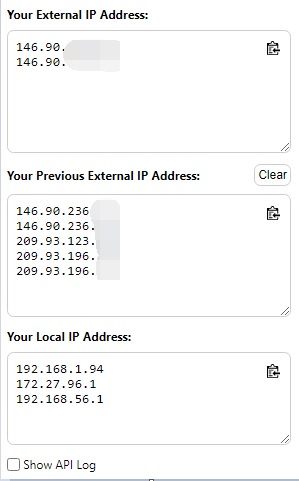
- Your external IP appears at the top, your local IP(s) below, and any previously seen public IPs in the middle.
- Use the 📋 button on any field to copy it, Refresh to re-check, or Clear to forget the saved history.
- Tick Show API Log to see which lookup endpoint answered.
This extension is intentionally minimal and collects no analytics:
- External IP is fetched from
what-is-my-ip.functionapi.workers.devandapi.ipify.org. Only those endpoints are listed inhost_permissions. - Local IPs are discovered in your browser via WebRTC and are never sent anywhere.
- Previous public IPs are stored with
chrome.storage.sync(so they follow your Chrome profile) purely so you can spot changes — clear them anytime with the Clear button. - The only Chrome permission requested is
storage.
See PRIVACY.md for the full privacy policy.
Found a security issue? Please do not open a public issue. Follow the responsible-disclosure process described in SECURITY.md to report it privately.
nvm use            # optional: select the recommended Node.js version
npm ci             # install the locked dev tooling
npm test           # run unit tests
npm run coverage   # tests + coverage report (enforces a minimum threshold)
npm run lint       # ESLint
npm run format     # Prettier (write)
npm run check      # lint + format check + coverage + build (run before a PR)
npm run build      # package show-ip/ into dist/show-ip-<version>.zip
The browser-independent logic lives in show-ip/js/iputils.js as a UMD module so it runs unchanged in the extension and under Jest. DOM/Chrome wiring stays in show-ip/js/ip.js.
Unit tests run in Node with Jest. Enforced coverage includes the pure extension helpers in show-ip/js/iputils.js and the coverage report renderer in scripts/coverage-report.js. The DOM/Chrome wiring in show-ip/js/ip.js is outside the numeric coverage scope; focused mocks, packaging invariants, and manual Chrome testing cover that integration boundary.
The suite also asserts manifest/package version synchronization, network
endpoint permissions, and locale integrity. npm run coverage enforces a
minimum threshold (95% statements/lines/functions, 90% branches) and fails the
build if coverage drops below it. Pull requests receive an updated coverage
comment with totals, targets, and per-file results after CI completes.
show-ip/              Extension source (Manifest V3)
  manifest.json       MV3 manifest (localised name/description)
  main.html           Popup markup + styles
  js/iputils.js       Pure, tested helpers (validation, classification, parsing)
  js/ip.js            Popup logic / DOM + Chrome API wiring
  _locales/           Localised extension name and short description
tests/                Jest unit tests (helpers + packaging invariants)
scripts/build.js      Cross-platform zip packager for the Web Store
scripts/coverage-report.js  Validates and renders PR coverage reports
.github/
  workflows/ci.yml    CI: lint, format, tests on Node 20/22, coverage + build
  workflows/coverage-report.yml  Secure PR coverage comment publisher
  workflows/badges.yml  Publishes JavaScript percentage to the badges branch
  dependabot.yml      Weekly npm + GitHub Actions dependency updates
  ISSUE_TEMPLATE/     Bug report & feature request forms
CONTRIBUTING.md       Contributor guide
SECURITY.md           Security policy & disclosure process
PRIVACY.md            Privacy policy
SUPPORT.md            Support channels and reporting guidance
CHANGELOG.md          Versioned release history
npm run buildThis reads the version from show-ip/manifest.json and
writes dist/show-ip-<version>.zip. The packager is pure Node (via archiver),
so it works on Windows, macOS and Linux without a system zip binary. Upload
the resulting zip in the Chrome Web Store Developer Dashboard.
Use the short and detailed descriptions in STORE_LISTING.md
for the listing; do not append a language or locale list.
PRs welcome! Please read CONTRIBUTING.md and run npm run check
before submitting.
Read SUPPORT.md for troubleshooting and issue-reporting guidance. To support ongoing maintenance: https://www.paypal.me/doctorlai/3.
See CHANGELOG.md for notable changes by version.