2026-09-15
- Support for macOS 26 Tahoe.
- New ability to target specific macOS versions (ex. 15.6.1) for both minor updates and major upgrades.
- Completely rearchitected
superpreferences mechanism allows for advanced alternate configuration workflows. In other words, you can now create multiple differentsuperworkflow configurations and activate them on an as-needed basis. - Significantly improved macOS minor update workflow is fully compatible on systems with all built-in automatic software update options enabled.
- New scheduling options for automatic deferrals when provisioning new systems and when you want to delay the start of a workflow after zero day.
- New workflow options for installing non-system software updates.
- Significant quality of life improvements for gathering information about the
superworkflow configuration, including a new--config-statusoption and two new logs:super-audit.logandsuper-metrics.log.
- Support for macOS 15 Sequoia.
- New scheduled installation workflows allow administrators or the end user to specify a date and time for the installation of macOS updates/upgrades, Jamf Pro Policies, or enforced system restarts.
- New schedule workflow active option allows administrators to set exactly when the
superworkflow is active, thus allowing for "maintenance windows". - MacAdmin's SOFA integration allows schedule and deadline options to align with macOS release dates (as opposed to when
superdiscovers a macOS release). - Completely rearchitected main
superlogic so all workflow options can be permanent (via configuration profile) or temporary until the requested workflow is completed. - Completely rearchitected software update/upgrade discovery to significantly improve reliability, performance, and improve support for native macOS software update restrictions deferral.
- Significantly improved behavior for alternate workflow targets (non-system updates, Jamf Pro Policies, and enforced system restarts) now support all deferral, schedule, deadline, and display options.
- Even more user interface customization options.
- Please visit the
superWiki for full details!
super5.1.x supports macOS 11 through macOS 26. Support for later versions of macOS are available in newer versions ofsuper.- Many
super4.x command line options and managed preferences are NOT compatible withsuper5.1.x - Most
super3.0 command line options and managed preferences are not compatible withsuper5.1.x - Previously saved
super3.0 and 4.x Apple silicon authentication credentials are automatically migrated the first timesuper5.1.x runs. - Refer to this spreadsheet (tab separated values) for migrating
supercommand line options. - Refer to this spreadsheet (tab separated values) for migrating
supermanaged preferences. - Updated example MDM configuration profiles.
- Updated Jamf Pro External Application Custom Schema.
- Updated Jamf Pro Extension Attribute scripts.
- No version of
super5.x is compatible with macOS 27 or later. Support for later versions of macOS are available in newer versions ofsuper. - The
super5.x workflow does not support Declarative Device Management (DDM) software update settings. You should continue to use traditional MDM configuration profiles to enforce software update settings. - There are currently no publicly available Background Security Improvement (BSI, formerly named Rapid Security Response) updates for any version of macOS. As such, production BSI update workflows have not been validated against this version of
super. - The Jamf Pro "new" Managed Software Updates feature remains unreliable if the workflow target is not the latest minor update or major upgrade. In the meantime, the legacy Jamf Pro software update API remains stable (although deprecated) and local authentication is always the most reliable.
- Note this sub-section only covers specific changes for 5.1.1 to 5.1.2. Please refer to other sections of the CHANGELOG full details of all the changes.
- The
superworkflow automatically exits if running on macOS 27 or later. - Improved helper verification mechanism now allows for installation of newer versions than required by the
superworkflow. (Thanks to @smithjw for this!) - Resolved an issue that may cause inaccurate macOS update targeting when the
--install-macos-minor-version-targetor--install-macos-major-version-targetoptions were used. super5.1.2 SHA-256: a8ac2a725c7b1402b23e835dc507eb9a37a3d67c20d25abab31b4f6ab221c2d6
- Note this sub-section only covers specific changes for 5.1.0 to 5.1.1. Please refer to other sections of the CHANGELOG full details of all the changes.
- Improved
dsclsearch mechanism improves support for network user accounts (Thanks to @tranziq for catching this one!) - Resolved a cache validation issue that could cause logic errors. (Thanks to @mdicecca for catching this one!)
- Resolved an issue affecting the deletion of
--scheduled-install-dateoption. (Thanks to @ir77io for catching this one!) - Resolved inaccurate error handling in the
--config-statusoption. (Thanks to @ir77io for catching this one!) - As always, internal typo fixes and improvements to both regular and verbose log output.
super5.1.1 SHA-256: c838f6eb4de1de4e24404c8c96c71c8afdc30cf97195b411306f6ea7ae9c408f
- Note this sub-section only covers specific changes for 5.1.0-rc6 to 5.1.0. Please refer to other sections of the CHANGELOG for the full details of all the changes.
- Main
superWiki significantly updated for version 5.1.x! - All new example screenshots (also moved into their own folder) for version 5.1.x!
- All external
superdocumentation (like the Wiki and this CHANGELOG file) ran through Apple Writing Tools Proofread function. - Resolved a deferral timer logic issue. (Thanks to @ir77io for catching this one!)
- As always, internal typo fixes and improvements to both regular and verbose log output.
super5.1.0 SHA-256: db823707b7e3cff004afbbc5ca3430040b77a30a76d497beb66317f804b99afe
- New mist-cli 2.3 is automatically installed if required to facilitate macOS installer workflows. (Thanks to @ninxsoft for his dedication to the project!)
- New debugging options allow you to test workflow targeting logic using previously generated *-list.log files. These debug options are enabled by manually specifying paths to previously generated *-list.log files via the following static parameters in the
superscript:MDMCLIENT_LIST_DEBUG_LOG,MACOS_INSTALLERS_LIST_DEBUG_LOG, andMSU_LIST_DEBUG_LOG. - Improved detection of errors in
softwareupdate --listresults. - Resolved an issue where making modifications to alternate configurations was unintentionally starting some non-standard
superworkflows (like the Install Now workflow). - Resolved an issue where the default deferral timer was not being selected when a menu deferral configuration was also enabled.
- Updated Jamf Pro External Application Custom Schema for
superv5.1.0. (Huge thanks to @adrian-brown-91 and @tonyyo11 for updating this!) - As always, typo fixes and improvements to both regular and verbose log output.
super5.1.0-rc5 SHA-256: 48984751d0d76fc28ea1419c0d3a35f5da201367ffde809f747e1892b69349d5
- New support for Jamf Pro 11.28 when using Jamf Pro API authentication workflows. Jamf Pro 11.28 also requires that the API credential used by
superhas the additional API privilegeView MDM command information in Jamf Pro API. Prior versions ofsuperdo not support Jamf Pro 11.28 when using Jamf Pro API authentication workflows. - New
<key>AuthJamfManagementID</key> <string>$MANAGEMENTID</string>managed preference allowssuperto determine the computer's Jamf Pro Management ID without making an additional Jamf Pro API call. If you are using Jamf Pro 11.28 with Jamf Pro API authentication workflows then you must deploy this new managed preference key or allow the API credential used bysuperto have the Jamf Pro API privilegeRead Computers. - New warning when the
superis unable to determine user Focus status if the process that startedsuperdoesn't have Full Disk Access permissions. - Added a specific
$PATHto avoid a myriad of issues that could be due to the unintentional use of non-built-in binaries. - New workaround to resolve a macOS issue that prevents the system from automatically downloading new macOS updates if an older update is still cached to the system. In this case, the
superworkflow will attempt to download the new update instead of waiting for the system automatic update. - New workaround to resolve a macOS issue where the
softwareupdatecommand fails to report the completion of a successful macOS download. - Improved handling of the
--deferral-timer-menuoption to prevent issues due to invalid configurations. - Improved handling of the
--scheduled-install-reminderoption to prevent issues due to invalid configurations. - Resolved several issues regarding automatic download deferrals and deadline timeouts. (Thanks to @cfsnate for spotting and resolving these issues!)
- Resolved several issues regarding scheduled install reminders. (Thanks to @jtwillbanks for spotting and helping resolve these issues!)
- Resolved an issue where the restart validation workflow would fail to complete if the system had not yet installed all security updates (like XProtect).
- Resolved an issue where the MDM enrollment URL could not be determined if an MDM debug configuration profile was installed. (Thanks to @Sot3 for spotting and resolving this issue!)
- Updated spreadsheet (tab-separated values) for migrating to
superv5.1.0 managed preferences. - Updated "All Options" example MDM configuration profile.
- Updated "All Options" example MDM property list.
super5.1.0-rc5 SHA-256: 15e08046d9d40eff081527299b8f7770a910d255bf32425df3cf4ec3e0bce76c
- Improved free storage space detection including failover methods courtesy of @ofirgalcon.
- Resolved a variety of issues preventing the
--display-hide-progress-baroption from working. - Resolved a variety of issues that caused parameter validation to fail if "X" was specified as a string in the
supermanaged configuration profile. - Resolved an issue that was incorrectly decrementing deferral counts before macOS update/upgrades were downloaded.
- Resolved an issue that caused inaccurate update discovery and targeting when the system was restarted outside of the
superworkflow. - Resolved an issue with causing inaccurate boolean values when using a temporary alternate configuration. (Thanks to @Tuttu for providing a solution to this issue!)
- Resolved an issue causing validation errors for the
--scheduled-install-daysoption. (Thanks to @jreeber and @jtwillbanks for providing solutions to this issue!) super5.1.0-rc4 SHA-256: 43a08d0c1ebb735688aca8e26b013b7f52310a16eef79375f30fdf1ca9edf775
- Resolved an issue that was improperly identifying macOS minor update installations as workflow targets.
super5.1.0-rc3 SHA-256: 2974649cea78109583005160f3d32489ba02b6cd63a9aea9e0e8dadeee8a075a
- Completely rearchitected software update/upgrade discovery (again) to resolve issues caused by inaccurate reporting from the
mdmclientcommand. Thesuperworkflow no longer relies solely on themdmclientcommand to determine software availability. As such,superworkflows are now more likely to leveragemist-clito determine macOS update/upgrade targets. - New
super-metrics.logcontains a history of elapsed times for total workflow completion and interactive user dialogs. In addition to total dialog open time, both the user's active (input devices are active) and inactive elapsed times are recorded while the dialog is open. - New support for code-signed alternate configuration preference files. Signing remains optional, but if an alternate configuration preference file has been code-signed, then it must be valid for
superto accept it. Therefore,superwill not accept any alternate configuration preference files that have been modified from their original signed state. - New
<key>ConfigCodeSignature</key> <string>Identifier</string>managed preference key enforces the use of code-signed alternate configuration preference files. If this key is present, then thesuperworkflow will only accept alternate configuration preference files that are code-signed and match the specified identifier. Both Apple Bundle and Apple Team identifiers are supported. - New
--install-macos-bsi-updatesoption overrides the--install-rapid-security-responsesoption. Presently, this "new" option only represents a name change as the underlying mechanism for macOS BSI updates appears to be similar to the legacy macOS Rapid Security Responses. The--install-rapid-security-responsesoption remains but is deprecated and will be removed in a future version ofsuper. - Renamed
--install-safari-updates-without-restartingoption replaces the--install-safari-update-without-restartingoption. The new option name is plural to match the format of the other non-system update options. - New behavior for the
--install-safari-updates-without-restartingoption takes priority over the--install-non-system-updates-without-restartingoption. - New "ramped status" detection now recognizes when the target macOS minor update has not yet automatically downloaded to the system because it's being delayed by Apple's incremental rollout mechanism. This status is reported to the super.log and to the
SuperStatuskey in the main settings property list. - New IBM Notifier 3.2.3 is automatically installed. (Thanks to @SMartorelli for his dedication to the project!)
- Resolved an issue that prevented non-system updates from being targeted for installation.
- Resolved an issue that resulted in inaccurate deferral counts.
- Updated spreadsheet (tab separated values) for migrating to
superv5.1.0 command line options. - Updated spreadsheet (tab separated values) for migrating to
superv5.1.0 managed preferences. - Updated "All Options" example MDM configuration profile.
- Updated "All Options" example MDM property list.
- Updated Jamf Pro External Application Custom Schema for
superv5.1.0. (Huge thanks to @tonyyo11 for maintaining this!) - As always, typo fixes and improvements to both regular and verbose log output.
super5.1.0-rc2 SHA-256: fdd0891117983d9864b6c6e79af1321acfbe07c8a53dfd0f19900c364d41a9f6
- New support for macOS 26 Tahoe.
- New
--install-macos-minor-version-target=macOSVersionNumberoption allows you to target specific macOS minor updates (for example, 15.6.1). Note that targeting specific minor updates that are not the latest version is very likely to require full macOS installer downloads. - Significantly updated
--install-macos-major-version-target=macOSVersionNumberoption allows you to target specific macOS major upgrades (for example, 15.6.1). Note that targeting specific major upgrades that are not the latest version is very likely to require full macOS installer downloads. - New
<key>ConfigTempOverride</key> <true/> | <false/>managed preference key allows temporary alternate workflow settings (started via the--config-start-temp=ConfigurationNameoption) to override conflicting managed preferences. - New mist-cli 2.2 (which now supports creating installers on macOS 15.6 and later) is automatically installed if required to facilitate macOS installer workflows. (Thanks to @ninxsoft for his dedication to the project!)
- Improved macOS installer validation now checks for matching target version and build number.
- Improved software status cache age verification now also allows for setting a specific age by adjusting the
SOFTWARE_STATUS_CACHE_AGE_MINUTESparameter in theset_defaults()function. - Improved Jamf Pro version tracking now accounts for full version numbers (ex. 11.20.1).
- Improved alternate workflow configuration logging.
- Resolved an issue that prevented saving changes to alternate workflow settings if there was a conflicting managed workflow setting.
- Resolved an issue that would cause workflow errors if duplicate non-system updates were discovered.
- Updated spreadsheet (tab separated values) for migrating to
superv5.1.0 command line options. - Updated spreadsheet (tab separated values) for migrating to
superv5.1.0 managed preferences. - Updated "Software Update Automatic Settings" example MDM configuration profile.
- Updated "Software Update Notification Settings" example MDM configuration profile.
- Updated "All Options" example MDM configuration profile.
- Updated "All Options" example MDM property list.
- As always, typo fixes and improvements to both regular and verbose log output.
super5.1.0-rc1 SHA-256: f28fab463885139970781cbe7aa83263f14b97a8246eb05a9ece0281fa6a10b9
- New
--config-clone=SourceConfigurationNameoption duplicates an existing alternate configuration preference file. This option must be used with the--config-edit=ConfigurationNameoption to specify (a new or existing) destination for the copy of the cloned configuration. Any additional options specified in the same run are also applied to the destination configuration. - New configuration preference file attribute
ConfigEditTimestampis the date and time of the previous edits made to that configuration file from a previoussuperrun. - Significantly improved download workflow assumes that macOS minor updates should be downloaded by the built-in automatic software update option. Workflows targeting macOS minor updates automatically defer if the update has not yet downloaded and the system is configured to automatically download macOS updates.
- Improved
--config-statusoption now shows if a macOS update or upgrade has been cached (downloaded and prepared) by the softwareupdate service. - Resolved an issue when using a
--config-edit*option that would improperly exit thesuperworkflow. - Resolved an issue when using a
--config-edit*option that would improperly disable thesuperworkflow from automatically re-launching. - Updated spreadsheet (tab separated values) for migrating to
superv5.1.0 command line options. - As always, typo fixes and improvements to both regular and verbose log output.
super5.1.0-beta5 SHA-256: 1ef92bbcb757037d6cc5c904bb91aad80df1b10ef364201160ff5bebbcd0ed8d
- New macOS Setup Assistant "done file" detection automatically defers the workflow if
superis installed during new system provisioning. In other words, it's now safe to installsuperduring macOS onboarding (including ADE workflows), as it will automatically defer based on the--deferral-timer-default=minutesoption or the default of 60 minutes. - New
--schedule-deferred-start-file=/local/pathoption automatically defers the workflow if the specified file is not found. This allows forsuperto be safely installed during extended macOS onboarding workflows (like Jamf Setup Manager, Setup-Your-Mac, SplashBuddy, etc.), as it will automatically defer based on the--deferral-timer-default=minutesoption or the default of 60 minutes. - New
--schedule-deferred-start-days=numberoption automatically defers the workflow until the specified number of days has passed since the zero date. Similar to the native macOS update/upgrade deferral mechanism, this option preventssuperfrom interrupting the user (or if there is no user, from automatically installing) until after the deferred start number of days has passed. - Resolved an issue that could prevent authentication options from being saved when using the
--config-edit-mainor--config-edit=ConfigurationNameoptions. - Resolved an issue that prevented a previously set automatic workflow launch when using the
--config-edit-mainor--config-edit=ConfigurationNameoptions. - Resolved an issue that prevented the
--config-delete=ConfigurationNameand--config-delete-alloptions from properly removing all relevant workflow settings. - Improvements to the workflow complete reset mechanism should prevent issues caused by previously scheduled installations not properly reseting.
- Updated spreadsheet (tab separated values) for migrating to
superv5.1.0 command line options. - Updated spreadsheet (tab separated values) for migrating to
superv5.1.0 managed preferences. - Updated example MDM configuration profiles for
superv5.1.0. - As always, typo fixes and improvements to both regular and verbose log output.
super5.1.0-beta4 SHA-256: a05ecc6ec1dea5568532196a70c98b178e944312ef45724f87afcbde1823f737
- New alternate configuration options allow you to maintain multiple different
superworkflow configurations:- New
--config-edit-mainoption allows you to create and update configuration settings in the mainsuperpreference file without starting the workflow. Any other workflow options specified at the same time (or in the same command line) are added to the main/Library/Management/super/com.macjutsu.super.plist. - New
--config-edit=ConfigurationNameoption allows you to create and update configuration settings in alternatesuperpreference files without starting the workflow. Any other workflow options specified at the same time (or in the same command line) are added to an alternate preference file located at/Library/Management/super/configs/com.macjutsu.super.ConfigurationName.plist. - New
--config-delete=ConfigurationNameoption deletes the specified alternate configuration preference. - New
--config-delete-alloption deletes all alternate configuration preferences in the/Library/Management/super/configs/folder.
- New
- New
--config-start-default=ConfigurationNameoption starts thesuperworkflow using the settings from the specified alternate configuration. Workflow settings in the default configuration take priority over the mainsuperpreferences. Additionally, settings that are only found in the mainsuperpreferences are also used in the workflow. To disable this option, use--config-start-default=X. - New
--config-start-temp=ConfigurationNameoption starts thesuperworkflow using the settings from the specified alternate configuration. Workflow settings in the temporary configuration take priority over BOTH the default configuration and the mainsuper. However, once the workflow defined by the temporary configuration has completed,superreturns to the default configuration or the mainsuperpreferences (if there is no alternate default configuration). Additionally, settings that are only found in the mainsuperpreferences are also used in the workflow. To disable this option, use--config-start-temp=X. - Significantly improved
--config-statusoption now returns a variety of information about the super workflow configuration and also now includes the installation history of macOS system and security updates. The installation history is generated by parsing output from thesystem_profilercommand, so this includes all macOS installations, not just those completed bysuper. - All active super preference files are now evaluated at the start of every workflow to ensure validity. This allows you to use alternate configuration preference files copied from another computer. In other words, you can create multiple
superworkflow configurations on your administrative computer and deploy them directly to theconfigsfolder of other computers. - New
--workflow-require-active-useroption only allows thesuperworkflow to continue if there is a logged-in user. With this option enabled, if there is no active user when thesuperworkflow runs, then an automatic error deferral will restart the workflow for later. - New
--workflow-reset-super-after-completion-offoption to disable this behavior if it was previously enabled in a super workflow. - Improved display icon caching to support multiple alternate configurations.
- Resolved an issue of improper handling of an edge case when IBM Notifier times out after an extremely long delay.
- Updated spreadsheet (tab separated values) for migrating to
superv5.1.0 command line options. - Updated spreadsheet (tab separated values) for migrating to
superv5.1.0 managed preferences. - Updated example MDM configuration profiles for
superv5.1.0. - Updated Jamf Pro External Application Custom Schema for
superv5.1.0. (Huge thanks to @tonyyo11 for taking this on!) - As always, typo fixes and improvements to both regular and verbose log output.
super5.1.0-beta3 SHA-256: b7064c5bd0e25186ddaf21f246a3526d89dea84ac891623b0d51b7145eadad65
- New
--versionoption returns thesuperversion number to standard output. Using this option does not require root permissions and does not start or interrupt thesuperworkflow. - New
--config-statusoption returns the status of a variety of items including the contents of thesuperfolder andsupersettings files. While this option does require root permissions, it does not start or interrupt thesuperworkflow. - New Jamf Pro Extension Attribute script to return the last few lines of the super-audit.log.
- New workflow behavior if the system has recently started (as defined by
$RECENT_STARTUP_AUTO_DEFERRAL_SECONDS), then an automatic error deferral will restart the workflow for later. This is to prevent unintended forced restarts in cases where the workflow was started before the user had a chance to log in. - Updated spreadsheet (tab separated values) for migrating to
superv5.1.0 command line options. - Updated spreadsheet (tab separated values) for migrating to
superv5.1.0 managed preferences. - Updated Jamf Pro External Application Custom Schema for
superv5.1.0. (Huge thanks to @tonyyo11 for taking this on!) - As always, typo fixes and improvements to both regular and verbose log output.
super5.1.0-beta2 SHA-256: 0d4a1bfa40bd8234a9f7759fbdc69ccf4033814c9cae0a0245c7b869e4f3f20a
- New
--install-safari-update-without-restartingoption targets Safari updates for installation without restarting the system. This is a counter-option to the existing--install-non-system-updates-without-restartingoption that targets all non-system updates for installation without restarting the system. This option is also unique in that if Safari is not active, then the workflow installs the Safari update automatically with no user interaction. - New
--display-accessory-safari-update-fileoption to specify a custom display accessory when the workflow target is a Safari update and Safari is actively in use. - New
--install-prioritize-non-restart-updatesoption works with either the--install-safari-update-without-restartingor the--install-non-system-updates-without-restartingoption to prioritize non-system updates before any other potential workflows. In other words, even if a macOS update or upgrade is possible, this option forces the super workflow to target non-system updates for installation first. After the appropriate non-system items are installed, then the next time (based on the relaunch deferral timer) the super workflow runs, it reverts to the default targeting behavior (likely a pending macOS update/upgrade). - New
/Library/Management/super/logs/super-audit.logis a significantly condensed version of the defaultsuper.logthat only contains the most important status changes. Entries in thesuper-audit.logare limited to items considered necessary for most change management policies. This includes: installation events, changes to workflow targets, changes to zero date, changes to deadlines, successful workflow completions, or any other event that would dramatically alter the super workflow behavior. - New IBM Notifier 3.2.2 is automatically installed. (Thanks to @SMartorelli for his dedication to the project!)
- All
curlusage now includes asuperuser-agent header that is defined via theSUPER_USER_AGENTparameter. (Thanks to the Jamf Marketplace team for this suggestion!) - Various
curlcleanup to improve syntax uniformity and readability. - Improved handling of inaccurate
mdmclientdeferral dates. - Clean-up of outdated files/folders in
superrepository. - New Super-Friends/Jamf-Pro folder for Jamf Pro specific items.
- Countless typo fixes and improvements to both regular and verbose log output. (Thanks to everyone who reported typos on both GitHub and #super on MacAdmins Slack)
- Updated example MDM configuration profiles for
superv5.1.0-beta1. super5.1.0-beta1 SHA-256: 7fc290bfeb72e79d8445be10000eda182c904d99974857b379f0975a4fe3f7a6
- Updated scheduled install user selection dialog now allows for selections as soon as two minutes from the present. This minimum time can be adjusted via the
DIALOG_USER_SCHEDULE_MINIMUM_SELECTION_MINUTESparameter in theset_defaults()function. - Significantly improved parsing of configuration profile restrictions for Apple software update deferrals now identifies and reports each type of restriction deferral (macOS major upgrades, macOS minor updates, and non-system software updates).
- Implemented workarounds to resolve issues with IBM Notifier's handling of non-standard combinations of system Language & Region and Date & Time settings.
- Resolved issues that could prevent the current scheduled installation from resetting after workflow completion.
- Resolved issues that could cause parse errors in the update discovery workflow.
- Main
superWiki updated to 5.0.0. super5.0.0 SHA-256: 730b9f74094f31618f2202a305f8a7d53273eab2aff571b0ff4ce65235f17e6c
- New IBM Notifier 3.2.1 is automatically installed. (Thanks to @SMartorelli for his dedication to the project!)
- Initial draft of the
superv5.x beta Wiki! - Recreated example screenshots for
superv5.x (also removed all previous screenshots). - Updated README page for
superv5.x. - If any deadline days option is specified, the calculated deadline date is now also saved to the local
superpreference file for reference. Thus allowing for additionalsuperstatus collection via third-party tools such as... - New Jamf Pro Extension Attribute script to return the current
superworkflow target. - New Jamf Pro Extension Attribute script to return the current
superworkflow zero date. - New Jamf Pro Extension Attribute script to return the current
superworkflow scheduled install date and time. - New Jamf Pro Extension Attribute script to return the current
superworkflow deadline days focus date. - New Jamf Pro Extension Attribute script to return the current
superworkflow deadline days soft date. - New Jamf Pro Extension Attribute script to return the current
superworkflow deadline days hard date. - Resolved an issue where resetting workflow items was running too often.
- Added logging to indicate that specifying "DIALOG" for the
--display-hide-progress-barand--display-notifications-centeredoptions will be ignored. - Updated documentation no longer includes "DIALOG" for the
--display-hide-progress-barand--display-notifications-centeredoptions. - Updated Jamf Pro Extension Attribute script to return the current
superworkflow next auto launch date and time. super5.0.0-rc1 SHA-256: 84532f9b0c67f65253206cbea28efd65a4f2fa6a9984db54a6d31b7c359cf691
- Significantly improved macOS update/upgrade download workflow now automatically attempts authenticated
softwareupdatedownloads if there are previously saved authentication credentials. Further, if the--auth-credential-failover-to-useror the--auth-mdm-failover-to-useroptions are enabled, the download workflow can fail over to user authentication. - Updated restart validation workflow now automatically retries every 5 minutes (as opposed to every 60 minutes) if there are errors when attempting to install non-system Apple software updates or interacting with Jamf Pro. This deferral timer can be manually modified in the script by editing the
DEFERRAL_TIMER_RESTART_VALIDATION_ERROR_MINUTESparameter. - Resolved issues that caused inaccurate detection of automatic Apple software update settings status.
- Resolved an issue that prevented use of the
--scheduled-install-user-choiceoption for non-authenticated workflows (like when installing non-system Apple software updates). - Resolved an issue that could allow the user to accidentally select a scheduled installation time in the past.
- Resolved an issue that was prompting for installation of macOS Rapid Security Responses (RSR) updates even when the
--install-rapid-security-responsesoption was not enabled. - Resolved an issue that was prompting for installation of non-system Apple software updates even when the
--install-non-system-updates-without-restartingoption was not enabled. - Countless typo fixes and improvements to both regular and verbose log output.
super5.0.0-beta5 SHA-256: fb407f3d625a4235795ccd626120afd89692255883b98c13048c001fd1b927f9
- New macOS update/upgrade download workflow detects authentication errors and automatically adjusts to require authentication for macOS update/upgrade workflows.
- Updated user authentication dialog variations to support authenticated downloads and scheduled installations.
- Improved error checking for incompatible workflow settings when using scheduled installation options.
- Resolved an issue that caused inaccurate software update status reporting.
- Resolved several issues preventing proper scheduled installation dialog flows.
- Resolved issues where items were not properly resetting after a completed workflow.
- Resolved an issue preventing creation of the
superservice account. (Thanks to @techtrekkie for finding this one!) - Countless typo fixes and improvements to both regular and verbose log output.
super5.0.0-beta4 SHA-256: 94abd4765009a2aa79bcfb6396a00361102cba37f61c46421ef5504a6092445e
- New
--schedule-workflow-activeoption allows you to define multiple weekday time frames that specify when thesuperworkflow is allowed to be active (aka "maintenance windows"). Each schedule workflow active time frame must be specified using the following formatDAY:hh:mm-hh:mmwhere weekdays are defined asMON|TUE|WED|THU|FRI|SAT|SUNand times are in 24-hour format. Multiple ranges are separated by a comma with no spaces. For example, if you want thesuperworkflow to only run on the afternoons during the middle of the work week then you would specify--schedule-workflow-active=TUE:13:00-17:00,WED:13:00-17:00,THU:13:00-17:00. - Significant rearchitecting to all deferral, scheduled installation, and deadline behaviors in order to coordinate with new
--schedule-workflow-activeoption. In most cases,superautomatically adjusts workflow timings to fit within the scheduled active time frames. These automatic adjustments always show as warnings in the super.log. - Significantly improved
--install-non-system-updates-without-restartingoption now behaves similar to other workflow targets (like standard macOS updates) with full support for all deferral, schedule, deadline, and display options. However, available macOS updates/upgrades workflow targets still take priority even if this option is enabled. - New
--display-icon-light-fileand--display-icon-dark-fileoptions allow you to specify different icons for macOS light and dark modes. The existing--display-icon-fileoption remains as a default icon option and as a fail-over if the user's appearance mode cannot be resolved. (Thanks to @scriptingosx for a method to determine the user's appearance mode!) - Significantly improved handling of display icon files to improve performance and reliability.
- New display accessory options are now aligned with workflow installation targets. These changes include:
- The
--display-accessory-update-fileoption has been renamed to--display-accessory-macos-minor-update-file. - The
--display-accessory-upgrade-fileoption has been renamed to--display-accessory-macos-major-upgrade-file. - New
--display-accessory-non-system-updates-fileoption shows a display accessory in dialogs when the--install-non-system-updates-without-restartingoption is also enabled and the workflow target is only non-system updates. - New
--display-accessory-jamf-policy-triggers-fileoption shows a display accessory in dialogs when the--install-jamf-policy-triggersoption is also enabled and the workflow target is only Jamf Pro Policy Triggers. - New
--display-accessory-restart-without-updates-fileoption shows a display accessory in dialogs when the--workflow-restart-without-updatesoption is also enabled and the workflow target is only a forced restart without any updates. - The
--display-accessory-user-auth-fileoption has been removed as it does not align with workflow targets. Instead, the user authentication dialog shows the display accessory that aligns with the workflow target. - The
--display-accessory-default-fileoption remains unchanged as the default display accessory for all workflow targets if no other display accessory options are specified.
- The
- Updated default date display string is now formatted as "AbbreviatedWeekday AbbreviatedMonth Day". As always, this can be modified by adjusting the
DISPLAY_STRING_FORMAT_DATEparameter. - Updated deferral button and deferral menu text for deferral times beyond the current day now read as "Tomorrow" or if further out, a date string.
- Updated day-based deadline dialogs now show the calculated deadline date (as opposed to the number of days specified as the deadline).
- New default date and time display string separator parameter
DISPLAY_STRING_FORMAT_DATE_TIME_SEPARATORnow defaults to a single space (previously was statically set as a dash surrounded by spaces). - Updated the default SOFA feed URL. (Thanks to @headmin for the heads up!)
- Updated dialog title bar strings now clearly indicate if the target workflow is a "Required System Restart" versus a "Required Installation (No Restart)".
- Updated test mode to support validation of new scheduling options and workflow modes.
- Updated verbose logging now shows
superscript line numbers. - Resolved an issue where setting the
--scheduled-install-daysor--scheduled-install-dateoptions for the first time was showing a scheduled installation reminder dialog even if it was not needed. - Resolved an issue where legacy
superfolder items were not being removed. - Resolved an issue where the automatic zero date was inadvertently changing if there was a failover from the
--schedule-zero-date-releaseoption. - Resolved an issue on Apple Silicon systems where
--scheduled-install-*options were being allowed even if there was no saved authentication. - Resolved an issue where non-standard installations of Java were causing the deferral menu to fail making a selection.
- Countless typo fixes and improvements to both regular and verbose log output.
super5.0.0-beta4 SHA-256: 119c3e891b2d116be21c32c6abb567f17aca4c5e00b4bd81a4aceca371cb931a
- New
--workflow-reset-super-after-completionoption can be combined with other local options to define a "temporary" workflow that resetssuperafter the workflow has successfully completed. For example, you can combine this option with the--install-macos-major-upgradesoption to begin a macOS major upgrade workflow that, upon completion, resetssuperto the default behavior of only installing macOS minor updates. Note that managed preferences (via configuration profile) still override any local settings. - Updated install now workflow behavior returns the
--workflow-install-now-offoption and associated managed preferenceWorkflowInstallNow. This allows you to once again define a "permanent" install now workflow behavior. Obviously, for a temporary install now workflow you can leverage the new--workflow-reset-super-after-completionoption. - New
--install-jamf-policy-triggers-without-restartingoption allows for installation of Jamf Pro Policies even if there are no available macOS update/upgrades. Alternately, you can force this workflow when also used with the--workflow-disable-update-checkoption. Further, this can be combined with the new--workflow-reset-super-after-completionoption for a "temporary" workflow. - New Jamf Pro Policy installation notification is displayed when a Jamf Pro Policy is running.
- All relevant dialogs and notifications are updated to accommodate workflows that only include Jamf Pro Policy installations. For example, the "Restart Now" button would read "Install Now".
- The
--install-jamf-policy-triggersoption replaces the--workflow-jamf-policy-triggersoption. - New "scheduled install" options override the standard deferral workflow options and the
--workflow-only-downloadoption in favor of installation taking place at a specific date and time. Note, however, the--workflow-install-nowoption still overrides all workflows, including any scheduled installation workflow. - New
--scheduled-install-daysoption allows you to specify the number of days after the zero date that a scheduled installation takes place. - New
--scheduled-install-dateoption allows you to specify a date and time that a scheduled installation takes place. - New
--scheduled-install-user-choiceoption adds a "Schedule" button to the standard deferral dialog. When clicked, this button opens a scheduled installation dialog that allows the user to select a date and time for installation. If any day or date deadlines are also specified, then the user is not allowed to select an installation date later than the soonest deadline. - New
--scheduled-install-reminderoption allows you to specify a list of minutes separated by commas (no spaces) that define how often a scheduled installation reminder dialog appears prior to a scheduled installation. For example, if you were to specify--scheduled-install-reminder=120,60,5, then a scheduled installation reminder dialog would appear at two hours, then at one hour, and then at five minutes prior to the scheduled installation. Further, if the user is allowed to reschedule for another time, then they can do so from the scheduled installation reminder dialog. - The
--schedule-zero-date-releaseoption replaces the--workflow-zero-date-releaseoption. - The
--schedule-zero-date-sofa-custom-urloption replaces the--workflow-zero-date-sofa-custom-urloption. - The
--schedule-zero-date-manualoption replaces the--workflow-zero-date-manualoption. - All workflows options (except for install now and download only) now fully support zero date and scheduled restart workflows.
- All options that support multiple workflow types now share the same simplified types. The affected options are
--display-unmovable,--display-hide-background,--display-silently,--display-hide-progress-bar,--display-notifications-centered, and--auth-mdm-failover-to-user. These options now all share the following workflow types:- ALWAYS - Always apply the option to all dialogs and notifications.
- DIALOG - Apply the option to all dialogs that require end user interaction.
- DEADLINE - Apply the option to dialogs and notifications if a deadline has passed.
- SCHEDULED - Apply the option to dialogs and notifications if there is a scheduled installation.
- INSTALLNOW - Apply the option to dialogs and notifications during an install now workflow.
- ERROR - Apply the option to dialogs and notifications if there is any workflow error.
- New mist-cli 2.1.1 is automatically installed if required to facilitate macOS installer workflows. (Thanks to @ninxsoft for his dedication to the project!)
- Improved SOFA macOS releases feed workflow now implements an HTTP Etag comparison to ensure that new feeds are only downloaded if different from the local cache. (Thanks to @headmin for this suggestion and sample code!)
- Significant updates to the
set_display_strings_language()function to facilitate new Jamf Pro Policy and scheduled installation workflows. - Resolved several issues preventing the restart validation workflow from completing properly.
- Resolved issues where the "OK" button was not appearing at an appropriate time.
- Resolved issues where the progress bar indicator was not appearing at an appropriate time.
- Resolved an issue preventing non-system installations from completing while a user is currently logged in. (Thanks to @kenchan0130 for providing a solution!)
- Countless typo fixes and improvements to both regular and verbose log output.
- Updated example MDM configuration profiles for
superv5.0.0-beta2. - Updated Jamf Pro External Application Custom Schema for
superv5.0.0-beta2. (Huge thanks to @tonyyo11 for taking this on!) - New super.checksum.txt file added to the root of the repository for those who wish to automate the installation of
superdirectly from GitHub. super5.0.0-beta2 SHA-256: 52a9a9c25a9283935dc46086700aa5ec1faab3bc1c58c26058e0893b847a257a
- New software update/upgrade status checking workflow leverages
mdmclientas the primary source for availability information. This significantly improves reliability, performance, and allows for confirmed discovery of native macOS software update/upgrade deferrals. - New software update/upgrade deferral parsing and reporting workflow ensures that native macOS deferral rules (when managed via macOS configuration profile) are always followed. Further, deferred items are reported in the super.log for reference.
- New system settings validation identifies and reports any automatic software update/upgrade settings that are considered insecure or could interfere with the super workflow.
- New
--workflow-zero-date-releaseoption leverages the public MacAdmin's SOFA macOS machine-readable JSON feed to discover release dates for use in workflows with deadline day options. (Huge thanks to the MacAdmin's SOFA contributors and @nonpunctual for JSON parsing inspiration!) - New
--workflow-zero-date-sofa-custom-url=URLoption to allow for a custom self-hosted MacAdmin's SOFA macOS machine-readable JSON feed. - New
--display-hide-progress-baroption hides the animated progress bar (as opposed to showing it) for notifications and alerts via the following types:- ALWAYS - Always hide the animated progress bar for all notifications and alerts.
- SOFT - Hide the animated progress bar for all notifications and alerts during a soft deadline.
- HARD - Hide the animated progress bar for all notifications and alerts during a hard deadline.
- INSTALLNOW - Hide the animated progress bar for all notifications and alerts during the install now workflow.
- POWER - Hide the animated progress bar for the power required alert dialog.
- STORAGE - Hide the animated progress bar for the insufficient storage alert dialog.
- New "mdmclient-list.log" sub-process log contains the last
mdmclientavailable software update/upgrade check and serves as the foundation for the new software update/upgrade status checking workflow. - All previous references to "Apple software update" or "ASU" have been changed to the more accurate "macOS software update" or "MSU". For example, the "asu-list.log" is now named "msu-list.log".
- Updated
super-starterLaunchDaemon script includes improved reliability and documentation. Additionally, thesuper-starterscript is now versioned along withsuperitself. - Resolved issues determining the last macOS startup time (because Apple broke the
uptimecommand), which could causesuperto unintentionally run after completing a macOS update/upgrade workflow. Now using thesyscltcommand to determine the last startup time. (Thanks to @BigMacAdmin for inspiration!) - Refactored several preference functions to leverage
PlistBuddyas opposed to thedefaultscommand. These changes not only improve performance, they are in line with Apple guidance to avoid usingdefaultsfor data stored outside of standard preference domains. (Thanks to @PicoMitchell for inspiration!) - On macOS 14.4 or later, the macOS software update processes are no longer restarted due to Apple-enforced security policies.
- All functions are now properly indented per shell style recommendations. (Thanks to @Honestpuck for the recommendation.)
- The "installer-list.log" is renamed to the more specific "macos-installers-list.log".
- Countless typo fixes and improvements to both regular and verbose log output.
- Updated example MDM configuration profiles for
superv5.0.0-beta1. - Updated Jamf Pro External Application Custom Schema for
superv5.0.0-beta1. (Huge thanks to @tonyyo11 for taking this on!)
- New option to save the user's password for future automatic macOS updates and upgrades. Literally, "Save Password" but for automatic macOS updates and upgrades.
- New display customization options including unmovable dialogs and hide background mode courtesy of IBM Notifier 3.x.
- New macOS installer workflows are now handled by
mist-cliintegration, thus removing allpythondependencies. - New LaunchDaemon architecture significantly improves automatic launch and deferment reliability for all
superworkflows. - New default "always on" behavior automatically checks for Apple software updates on a regular basis.
- Support for Jamf Pro 10.48+ (Beta) Managed Software Updates.
- Support for Jamf Pro 10.49+ API Roles and Clients.
- Please check out the updated
superWiki for more details!
super4.x requires macOS 11 or newer (all code supporting macOS 10.x has been removed).- All
super4.x code has been refactored for style, clarity, and uniformity. As such, nearly every single option name has been changed. - Most
super3.0 command line options and managed preferences are not compatible withsuper4.x. - Previously saved
super3.0 Apple silicon authentication credentials are automatically migrated the first timesuper4.x runs. - It is safe to mix
superversion 3.0 and 4.x managed preferences (except for the DisplaySilently key) in a single configuration profile. However, each version only recognizes the managed preference keys that are compatible with that version. - Refer to this spreadsheet (tab-separated values) for migrating
super3.0 command line options to version 4.x. - Refer to this spreadsheet (tab-separated values) for migrating
super3.0 managed preferences to version 4.x. - Updated Jamf Pro Extension Attribute scripts now support both
superversions 3.0 and 4.x. - Updated example MDM configuration profiles for
superv4.x.
- The Jamf Pro (Beta) managed software updates feature does not support the macOS beta program. To install macOS beta updates or upgrades, you must disable the (Beta) managed software updates feature in Jamf Pro or use a local authentication option.
- New IBM Notifier 3.1.0 is automatically installed. (Thanks to @SMartorelli for his dedication to the project!)
- Improved IBM Notifier behavior no longer clips the end of line wrapped text.
- Improved IBM Notifier behavior now fully ignores the Command-Q keyboard shortcut. Previously
superhad to restart IBM Notifier when a user quit with the Command-Q keyboard shortcut. - Resolved a workflow issue that could prevent the restart validation workflow from installing non-system updates.
- Resolved an issue preventing accurate reporting of the current macOS version.
- Resolved an issue where macOS installers on any non-system volume were being accidentally deleted.
super4.0.3 SHA-256: 2c7411a4bfa84a63e20955d18d6c6ba19933b2cf35b04f91bbcac98c666e335c
- Improved
--open-logsoption behavior now opens all possiblesuperlogs. - Improved Apple silicon authentication options behavior when there is no actively logged in user. In most cases, if user authentication is required but there is no active user, the
superworkflow automatically tries again later. - New error detection for the combination of the Jamf Pro (Beta) Managed Software Updates workflow with the
--install-macos-major-version-targetoption. - Improved non-system updates workflow has better handling of errors and user notifications.
- Resolved issues causing inaccurate log file size estimates and recursively larger log archives. This recursion issue was exacerbated by prolonged use of the
--verbose-modeoption, as such thesuperWiki has also been updated. - New failsafe log archive mechanism automatically removes any files larger than 10,000 KB (10 MB) in the log archive folder. Given that the
superlogs are automatically archived once any individual log reaches just 1,000 KB (1 MB), no compressed log archive should ever reach 10 MB. - Resolved an issue causing erroneous text in the current user's "real name".
- Fixed various typos and improved a few log reporting behaviors.
- New Jamf Pro API testing scripts in the Super Friends folder: Create-MDM-Logs.sh, Create-MDM-Update-Jamf-API-Latest.sh, and Create-MDM-Update-Jamf-API-Version.sh
super4.0.2 SHA-256: a3568c093bd220a642c1bd9f51f8bf98d474b9e57a6f827fb7733d3dde2dbf6b
- New super.log behavior, if there is a current active user then the UID is now also shown in the log.
- Reduced the minimum storage space required for a macOS major upgrade to 25 GB plus the size of the download (previously it was 35 GB plus the size of the download).
- Resolved a regression issue that wasn't installing the latest version of IBM Notifier 3.0.3.
- Resolved an issue preventing reliable detection of a system currently at the login window, thus causing download workflow errors.
- Resolved an issue preventing the successful installation of macOS updates when there is no current active user.
- Resolved an issue where some
softwareupdateerrors were not being reported accurately. - Resolved an issue where some authentication log entries were not being reported. (Thanks to @blakeusblade for finding this one!)
- Fixed a small typo in a Jamf Pro API call. (Thanks to @master-vodawagner for finding this one!)
super4.0.1 SHA-256: 49de57115dc6c280e30edc20023c4376f9a52da99fba44610f055a0cd51164dd
- Resolved an issue where the
--display-unmovableoption was preventing IBM Notifier dialogs from appearing on top of other windows or in the correct location on the screen. (Thanks to @SMartorelli for the workaround!) - Resolved an issue preventing the Jamf Pro (Beta) Managed Software Update API from installing macOS beta updates and upgrades.
- Resolved an issue where an apostrophe in a user's "real name" was causing
superto error. - Resolved an issue where setting the
--workflow-jamf-policy-triggerswas unintentionally running the dialog workflows again. - Improved logging when using the
--auth-ask-user-to-save-passwordoption. - Fixed typos.
- The main
superWiki has also been updated to v4.0.0. super4.0.0 SHA-256: fc82babefa316afeaf6507b1babae0f7fb6f499c0e0b1d3dedecd3fa53f16eb2
- Resolved a workflow issue where macOS 12.3-12.x systems are no longer able to leverage
softwareupdatewhen targeting major upgrades to macOS 13. This workflow now uses the full macOS installer. - Resolved an issue where the
--auth-mdm-failover-to-user=ALWAYSoption was not failing over to user authentication. super4.0.0-rc1 SHA-256: 6eeff90acf6589b07c6f66a46f125f4b4faed7b7c84dccbb336bc6e1e8c2a4c3
- Resolved (third time's a charm?) issues preventing the last startup date collection from working properly. (Thanks to @ofirgalcon for testing this time!)
super4.0.0-beta7 SHA-256: fa3cc35a0224169128b5388fec1c2d09f3627597dd569bcc8e928e8966e0f242
- Resolved issues preventing the last startup date collection from working properly. (Thanks to Michael Z on MacAdmins Slack for helping on this one!)
super4.0.0-beta6 SHA-256: a57710bb200e7bd702be87019b87675c8f1afefcabc284eeff63a966eeaf79ba
- New automatic archival of active
superlogs to the "logs-archive" folder if any individualsuperlog file grows larger than 1000 KB in size. This new default behavior can be modified by manually editing parameters in theset_defaults()function. - New automatic archival of any legacy
superlogs to the "logs-archive" folder. - New deadline behavior, users are no longer allowed to choose a deferral past a days or date deadline. If a deadline is sooner than any user deferral option then the deferral times are reduced to match the closest deadline.
- New deadline behavior, if a deadline is soon then any dialog timeout option times above 120 seconds (2 minutes) are reduced to 120 seconds.
- New deadline behavior, if the
superworkflow is running within 120 seconds of a deadline, it waits for the deadline to expire instead of offering any deferral. - New
--display-notifications-centeredoption shows non-interactive notifications in the center of the screen (as opposed to the top right) via the following types:- ALWAYS - Always show non-interactive notifications in the center of the screen.
- SOFT - Show non-interactive notifications in the center of the screen during a soft deadline.
- HARD - Show non-interactive notifications in the center of the screen during a soft deadline.
- INSTALLNOW - Show non-interactive notifications in the center of the screen during the install now workflow.
- New support for local user account names if they have spaces. (Thanks to Emmanuel Ergand on MacAdmins Slack for testing this one!)
- New automatic error deferral when the "only download" workflow is enabled, but there is no active user. This is necessary because
softwareupdateis unable to "only" download macOS updates (but it can fully install them) if there is no active user. - Rearchitected last startup date collection to support multiple time formats. (Thanks to @ofirgalcon for helping with this one!)
- Rearchitected Jamf Pro version detection to provide more accurate version numbers.
- Resolved several issues preventing the user's password from being saved or retrieved from Keychain.
- Resolved issues preventing the super-Deadline-Counter-Soft-Jamf-Pro-EA.sh script from working properly.
super4.0.0-beta5 SHA-256: ffd6e599a399109e9d2d881ef9f92ffdd96bb6c1bc8d8c80b267f28282f73079
- First draft of the new
superv4.0.0-beta Wiki! Please note that this Wiki itself is also a "beta", so expect updates and corrections. - Rearchitected Jamf Pro API calls to specify the exact macOS update or upgrade version. This change avoids Jamf Pro/macOS product issues that are known to unintentionally upgrade macOS even when an update was requested.
- Rearchitected automatic zero day now also saves the target macOS version along with the zero day date. This prevents the zero day date from unintentionally resetting when the available update caches are rechecked.
- Rearchitected the insufficient storage and power required alerts as dialogs (previously used notification functions). This resolved several issues preventing those dialogs from respecting display timeouts.
- Updated insufficient storage and power required alerts now support optional display customizations including the dialog timeout countdown, the help button, and the warning button.
- Resolved (no, really this time?) a permissions issue preventing display of the custom display icon cache. (Thanks to @master-vodawagner for helping with this one.)
- Resolved an issue that prevented
superfrom saving the user password to the keychain when a standard (non-admin) user was active. - Fixed a few typos and improved variable logging.
super4.0.0-beta4 SHA-256: 574fb4822211e1efc136629310ffec89b14a4a5d7dc1477e4dd1e61ce4e3050c
- New automatic installation of
mist-cliversion 2.0 if required to facilitate macOS installer workflows. (Huge shout out to @ninxsoft) - If the
--auth-delete-alloption is used with other authentication options, the--auth-delete-alloption takes priority and no longer allows for other credential options. - Further refinements to the saved user authentication workflow.
- Resolved an issue where previously saved authentication credentials were being unintentionally deleted.
super4.0.0-beta4 SHA-256: fca929a284893e6019f337acc2993a8b254490981920a8afcb56c69b40b3d399
- New startup behavior now waits for the
loginwindowprocess before continuing. This reducessoftwareupdateerrors during the restart validation workflow. - Further refinements of the
--auth-ask-user-to-save-passwordworkflow, including that the local account name is no longer stored in thesuperpreference file. - Resolved an issue preventing the identification of the last startup date on macOS 14.
- Resolved an issue preventing user authentication failover if the previously saved user password was invalid.
- Resolved an issue preventing macOS major beta upgrades from being properly discovered.
- Resolved an issue causing calculation errors in macOS minor update required installation size.
- Resolved an issue that caused repeated download attempts of macOS major upgrades.
- Resolved issues causing some display behavior options (
--display-unmovable,--display-hide-background, and--display-silently) from being applied when multiple dialogs or notifications are shown. - Resolved an issue preventing the
--auth-mdm-failover-to-useroption from working. (Thanks to @croaker-1 for suggesting a fix to this one.) - Resolved a potential permission issue preventing display of the custom display icon cache. (Thanks to @master-vodawagner for suggesting a fix to this one.)
- Updated Jamf Pro config profile external application custom schema for
super4.0.0-beta2. (Thanks to @robjschroeder for updating this!) super4.0.0-beta2 SHA-256: 40824d6425757022af8c78a9942e81c4a9c442f83c808950429efcf71afcfb2e
- New
--usageand--helpoptions behavior now no longer requiressudo, or installssuperitems, or writes anything to the super.log, or interferes with any runningsuperworkflow. However,superstill installs automatically (if needed) when using any other options. - New default behavior if no updates/upgrades are available (or allowed),
supernow automatically checks for new updates/upgrades on a recurring basis. Thus, the--recheck-deferoption has been replaced by this default behavior. - New deferral timer behavior, all deferral timer options are now in minutes (dialog timeouts remain in seconds).
- New deferral timer behavior, all deferral timer options now allow you to specify up to 10080 minutes (1 week).
- New
--deferral-timer-workflow-relaunch=minutesoption allows you to override the default check for new updates/upgrades deferral interval time of six hours (360 minutes). - New
--workflow-disable-relaunchoption preventssuperfrom checking for new updates/upgrades on a recurring basis. - New
--auth-ask-user-to-save-passwordoption to save the user's password to the user's keychain after a successful user authentication dialog. - New
--auth-credential-failover-to-useroption enables failover to user authentication if any new or previously saved authentication option fails. (The--auth-mdm-failover-to-useroption remains as is still used to facilitate failover specific to MDM workflows.) - New saved authentication behavior, only one authentication option can be active at any given time. If multiple authentication options have been specified the priority order is;
--auth-ask-user-to-save-password>--auth-local-account>--auth-service-add-via-admin-account>--auth-jamf-client>--auth-jamf-account - New Apple silicon credential storage mechanism now encodes all keychain items as base64. This allows for storing Unicode text strings and further obfuscates the authentication credentials.
- New Apple silicon credential storage mechanism now also stores all saved administrator credential "account names" in the system keychain. The "account names" were previously stored in the
superpreference file. - Previously saved
super3 Apple silicon authentication credentials are automatically migrated to this new storage mechanism the first timesuper4 runs. - New support for Jamf Pro 10.48+ (Beta) Managed Software Updates API.
superautomatically detects if this feature is enabled on your Jamf Pro server. - New permissions requirements for the (Beta) Managed Software Updates API:
- Jamf Pro Server Objects > Managed Software Updates > Read & Create
- Jamf Pro Server Objects > Computers > Read
- Jamf Pro Server Objects > Mobile Devices > Read
- Jamf Pro Server Actions > Send Computer Remote Command to Download and Install macOS Update
- Jamf Pro Server Actions > Send Mobile Device Remote Command to Download and Install iOS Update
- New support for Jamf Pro 10.49+ API roles and clients authentication. The new
--auth-jamf-client=ClientIDand--auth-jamf-secret=ClientSecretoptions allow you to specify credentials for this new authentication mechanism. - New Jamf Pro API computer ID discovery method leverages the Jamf binary if no Jamf Pro ID is provided via
superMDM configuration profile. (The Jamf Pro API privilege for "Computers Read" is no longer used to resolve the Jamf Pro ID.) - New
--jamf-custom-url=URLoption allows you to override the default Jamf Pro management URL for a custom Jamf Pro API URL. - New IBM Notifier 3.0.3 is automatically installed.
- New dialog and notification behavior now automatically re-opens if the user attempts to quit via Command-Q keyboard shortcut.
- Updated
--display-silentlyoption now allows for selectable display type behavior, see below for the available types. - New
--display-unmovableoption prevents the user from moving dialogs and notifications. Thus, the--display-redrawoption has been removed. - New
--display-hide-backgroundoption hides (via translucent blur) the background when displaying dialogs and notifications. - The new
--display-silently,--display-hide-background,--display-hide-backgroundoptions modify display behavior via the following types:- ALWAYS - Modify display behavior for all dialogs and notifications.
- SOFT - Modify display behavior for dialogs and notifications during a soft deadline.
- HARD - Modify display behavior for dialogs and notifications during a soft deadline.
- INSTALLNOW - Modify display behavior for dialogs and notifications during the install now workflow.
- DEFER - Modify display behavior for the defer or restart dialog.
- USERAUTH - Modify display behavior for the user authentication dialog.
- POWER - Modify display behavior for the power required alert dialog.
- STORAGE - Modify display behavior for the insufficient storage alert dialog.
- New default behavior, no
superdialog ever times out unless you use the--dialog-timeout-default=secondsoption. This option sets the default timeout for any dialog that doesn't have a specific timeout setting. - New individual dialog timeout options now include the following options:
--dialog-timeout-restart-or-defer=seconds--dialog-timeout-soft-deadline=seconds--dialog-timeout-user-auth=seconds--dialog-timeout-insufficient-storage=seconds--dialog-timeout-power-required=seconds
- The user authentication dialog now shows the dialog timeout countdown (only when no custom display accessory is enabled).
- New (renamed)
--workflow-install-nowoption behavior now works when there are no active users. - New (renamed)
--workflow-install-nowoption behavior is now a temporary option that is not saved for future runs ofsuper. As such, theInstallNowmanaged preference has been removed. - New rearchitected macOS installer workflows leverage
mist-cliinstead oferase-install.shfor installer listings and downloads. (Thanks for your service @grahampugh) - New automatic installation of
mist-cliversion 1.15 if required to facilitate macOS installer workflows. (Huge shout out to @ninxsoft) - New internal mechanisms to validate downloaded macOS installers. (Thanks to @grahampugh for code inspiration!)
- Upgrade workflows using the macOS installer now use more accurate storage space requirements courtesy of
mist-cli(previously this was statically set to 13GB for all macOS installers). - Systems with macOS 13 and newer no longer check for macOS installers (as they should be able to perform a macOS major upgrade via
softwareupdatefor all workflows). jamfHelperis no longer supported, as such the following options have been removed:--icon-size-jamf=pixels--prefer-jamf-helper--prefer-jamf-helper-offjamfHelperis no longer a display option (all code supporting jamfHelper has been removed). Thus, the--icon-size-jamfand--prefer-jamf-helperoptions have been removed.- The default battery level required percentage for Mac computers with Apple Silicon is now 20% (Intel remains at 50%).
- Improved
--reset-superclears local preferences for all versions ofsuperincluding legacy preferences. - Improved temporary file methods for helper installation are now more secure. (Thanks to @giantwombat and @paragonsec for recommending this one!)
- All
superlogs are now stored in the "logs" folder inside thesuperworking folder. At this time legacysuperlogs are not moved to this new location. - Removed Python dependency for Jamf Pro API token extraction. (Thanks to @jelockwood for this one!)
- Resolved an issue where MacBook computers with M2 chips were not being properly identified as portables.
- Resolved an issue where the patch version number (11.7.10 <- this last number) of macOS minor updates were not being properly identified.
- Countless improvements to both regular and verbose log output.
super4.0.0-beta2 SHA-256: f179ef824b128510f8867388d6d0252044cd2b4b36036181293a7601873c9ee3
2023-06-01
- New reporting of Jamf Pro version number in super.log, if the computer is managed by Jamf Pro. (Thanks to @wacko for recommending this one!)
- New Jamf Pro External Application Custom Schema for MDM Configuration Profiles courtesy of @wacko and @theadamcraig!
- Improved verbose mode now shows the saved
supersettings (com.macjutsu.super.plist) on exit. - Resolved an issue causing the cached macOS upgrade status to fail, which also led to inadvertently deleting macOS installers. (Thanks to multiple folks in #super on MacAdmins Slack for spotting this one!)
- Resolved an issue where, in verbose mode only, the local user authentication dialog was erroneously sending the user's password to the super.log. Now, similar to other password displays in verbose mode, it's only sent to command line output. (Thanks to Lewis B in #super on MacAdmins Slack for finding this one!)
- Fixed. So. Many. Typos.
super3.0 SHA-256: ac297dd3f5496a20648e35b73313ccddd8843a75cc95c9dadb9d900a60b8edd8
2023-05-30
- The Wiki has finally been updated with a first draft for
superversion 3! - Added a bit of additional verbose mode logging.
- Resolved an issue that prevented the correct number of days from showing in the soft days deadline user authentication dialog.
- Resolved an issue that was unnecessarily deleting update and upgrade cache information. (Thanks to @gzilla13 for finding this one!)
super3.0rc2 SHA-256: 8999783b7fd29e43360b167a61d7e566b0de9be89e7d5c6cca2d3bf7112a593c
2023-05-18
- UPGRADE NOTICE: Any version of
superprior to 3.0b4 may unintentionally upgrade computers with macOS 12.6.2 to macOS 13.1+. You should avoid using any version ofsuperprior to version 3.0b4 on macOS 12 or newer. - New additional MDM failover type of
--user-auth-mdm-failover=NOSERVICEfails over to the user authentication workflow any time the MDM service is unavailable or the API account fails to authenticate. - Updated macOS beta program detection method for macOS 13.4 and later.
- New Jamf Pro extension attribute script collects the number of times the Focus Deadline had been deferred.
- New Jamf Pro extension attribute script collects the number of times the Soft Deadline had been deferred.
- New Jamf Pro extension attribute script collects the number of times the Hard Deadline had been deferred.
- Resolved issues causing bad macOS update size calculation in non-USA regions. (Thanks to @davidjimenezm for fixing this one!)
super3.0rc1 SHA-256: 88e8b15c02bff48dcab1842092289f66eea1b38a2d470ae6361ecc71ed0fe7b3
2023-05-04
- UPGRADE NOTICE: Any version of
superprior to 3.0b4 may unintentionally upgrade computers with macOS 12.6.2 to macOS 13.1+. You should avoid using any version ofsuperprior to version 3.0b4 on macOS 12 or newer. - Resolved an issue preventing the macOS update via MDM workflow from starting properly.
- Resolved an issue causing erroneous test mode timeout warning dialogs. (Thanks to Connor Garside in #super on MacAdmins Slack for finding this one!)
- Resolved an issue where the MDM service check was too aggressive. (Thanks to Julien vander Straeten in #super on MacAdmins Slack for finding this one!)
- Resolved an issue causing the script to exit due to a bad macOS update size calculation. (Thanks to David C. in #super on MacAdmins Slack for finding this one!)
super3.0b12 SHA-256: 747d9311ff411904b4a0e0cd0d17ab1ad7e4169f5c364e8e41c39751e0940dd5
2023-05-04
- UPGRADE NOTICE: Any version of
superprior to 3.0b4 may unintentionally upgrade computers with macOS 12.6.2 to macOS 13.1+. You should avoid using any version ofsuperprior to version 3.0b4 on macOS 12 or newer. - New support for macOS 13 Rapid Security Response (RSR) updates. By (Apple) design, RSR updates still require a system restart to completely install and must also be installed separately from other macOS updates/upgrades. For example, macOS 13.3.1 must be installed before the system can install the macOS RSR 13.3.1 (a) update. However, the total workflow time for completing a RSR update is much faster than a standard macOS update.
- New
--allow-rsr-updatesoption must be specified to install RSR updates, otherwise the defaultsuperbehavior is to not install RSR updates. - New
--display-accessory-user-auth=/local/path or URLoption can accept a local path or a web URL (this option also requires setting the--display-accessory-type=TYPEoption). This shows specific display accessory content for the user authentication dialog. - New bootstrap token validation for computers running macOS 13.3 or later. Earlier versions of macOS can only report if the bootstrap token was previously escrowed, but unfortunately, there is no local method to determine if the escrowed token is still valid.
- Renamed
--enforce-non-system-updatesoption replaces the--enforce-all-updatesoption. This is only a name change to improve clarity of the feature. - Renamed
--defer-dialog-timeout=secondsoption replaces the--defer-display-timeout=secondsoption. This is only a name change to improve clarity of the feature. - Renamed
--soft-dialog-timeout=secondsoption replaces the--soft-display-timeout=secondsoption. This is only a name change to improve clarity of the feature. - Renamed
--restart-without-updatesoption replaces the--force-restartoption. This is only a name change to improve clarity of the feature. - Updated MDM workflow is now more reliable when used with newer versions of Jamf Pro.
- Updated Generate-MDM-Update-Jamf-API.sh script aligns with updated MDM workflow.
- Updated
--verbose-modeoption now creates two additional debug-level logs for troubleshooting the MDM workflow located at/Library/Management/super/mdmCommandDebug.logand/Library/Management/super/mdmWorkflowDebug.log. - Updated user authentication MDM failover workflow can now prompt for credentials earlier, detect more potential MDM failures, and only attempt to escrow the bootstrap token when the MDM service is actually available.
- Updated test mode validation temporarily adjusts timeouts to improve the test mode behavior. (Thanks to Dustin Nikles in #super on MacAdmins Slack for finding this one!)
- Updated method for detecting if the Jamf binary is the parent process. (Thanks to @iDrewbs for finding this one!)
- Updated method for finding available storage space when no user is logged in. (Thanks to @gzilla13 for finding this one!)
- Resolved issues causing improper calculation of macOS update sizes in non-USA regions. (Thanks to @gzilla13 and @davidjimenezm for helping with this!)
- Resolved issues causing improper validation of dialog timeout options. (Thanks to @gzilla13 for finding this one!)
- Resolved issues preventing the Defer button from showing the correct deferment time. (Thanks to @iDrewbs for finding this one!)
- Resolved issues preventing the completion of the install non-system updates workflow.
- As always, countless logging refinements and correction of typos.
- Updated example logs. (Still more examples to come in the future!)
- Updated example MDM configuration profiles for
super3.0b11. super3.0b11 SHA-256: 7e74c463511b2962c7b984db889256a98c606219fe70af89c2d9d32981f89fd0
2023-03-29
- UPGRADE NOTICE: Any version of
superprior to 3.0b4 may unintentionally upgrade computers with macOS 12.6.2 to macOS 13.1+. You should avoid using any version ofsuperprior to version 3.0b4 on macOS 12 or newer. - Updated
--user-auth-mdm-failover=TYPE,TYPE,TYPEoption now allows you to specify one or more failover types separated by commas (no spaces) for when the macOS update/upgrade via MDM workflow fails. The supported MDM failover types have also changed slightly...--user-auth-mdm-failover=ALWAYSfail over to the user authentication workflow any time the MDM workflow fails.--user-auth-mdm-failover=HARDfail over to the user authentication workflow when the MDM workflow fails and a hard deadline has passed.--user-auth-mdm-failover=SOFTfail over to the user authentication workflow when the MDM workflow fails and a soft deadline has passed.--user-auth-mdm-failover=INSTALLNOWfail over to the user authentication workflow when the MDM workflow fails and during an install now workflow.--user-auth-mdm-failover=BOOTSTRAPfail over to the user authentication workflow if the computer's bootstrap token has not been escrowed with the MDM service. This option also automatically repairs the bootstrap token escrow if the local user is an administrator with a secure token.
- The
--display-accessory-content=/local/path or URLoption has been replaced by multiple new display accessory content options (as before these options also require setting the--display-accessory-type=TYPEoption)...- New
--display-accessory-default=/local/path or URLoption can accept a local path or a web URL. This shows the display accessory content for all macOS updates and upgrades. - New
--display-accessory-update=/local/path or URLoption can accept a local path or a web URL. This shows the display accessory content for only macOS updates. - New
display-accessory-upgrade=/local/path or URLoption can accept a local path or a web URL. This shows the display accessory content for only macOS upgrades.
- New
- Updated Generate-MDM-Logs-Filtered.sh script replaces
Generate-MDM-Logs.shand creates filtered logs similar to whatsupergenerates for troubleshooting MDM workflow issues. - New Generate-MDM-Logs-Unfiltered.sh script creates detailed ManagedClient and softwareupdated logs for troubleshooting MDM workflow issues.
- New Example-Logs folder contains multiple examples of successful macOS update/upgrades with different platforms and workflows. (More examples to come in the future!)
- The
$softwareUpdateTimeoutSECONDSincreased to 1200 seconds becausesoftwareupdatefails to report macOS preparation progress reliably even when it's working. - The automatic removal of unnecessary macOS installers now ignores installers found in user home folders, except for installers found in ~/Applications, ~/Desktop, and ~/Downloads. In other words, if an unnecessary macOS installer is found in ~/Documents or ~/Library, it will be ignored (the presumption being that it's an intentional archive), but if found in ~/Downloads, it will be deleted. (Thanks to @dustin and @julienvs in #super on MacAdmins Slack for sacrificing their personal macOS installer archive!)
- Resolved an issue during installation if the
/user/local/binfolder was missing from the local system. (Thanks to Matthieu Sibilleau in #super on MacAdmins Slack for finding this one!) - Resolved several issues where the deferral timer was not being set properly. (Thanks to Dustin Nikles and Scott Thompson in #super on MacAdmins Slack for finding this one!)
- Resolved an issue where the enforce all items workflow was not properly closing notifications. (Thanks to Scott Thompson in #super on MacAdmins Slack for finding this one!)
- Resolved an issue where the macOS update/upgrade download sizes were improperly calculated when a comma was used in the download size. (Thanks to MiWeMP in #super on MacAdmins Slack for finding this one!)
- As always, countless logging refinements and correction of typos.
- Updated example MDM configuration profiles for
super3.0b10. super3.0b10 SHA-256: 737f9a054d86173bc08e07bfdf23045b869b6c54a9cf6d3851f2f638aed07105
2023-03-21
- UPGRADE NOTICE: Any version of
superprior to 3.0b4 may unintentionally upgrade computers with macOS 12.6.2 to macOS 13.1+. You should avoid using any version ofsuperprior to version 3.0b4 on macOS 12 or newer. - New
--install-nowworkflow option provides full support for "self-servicing" workflows that are started by an active user. With this option enabled, the macOS update/upgrade workflow starts immediately. Additionally, if the--install-nowoption is enabled via command-line, and the workflow is successful, this option is not saved for future runs ofsuper. Finally, any failures during the install now workflow do not create an automatic deferral to try again later. - New progress notifications for the install now workflow include...
- An install now workflow "getting started" notification that appears as soon as the workflow starts.
- An install now workflow "downloading" notification that appears if the macOS update/upgrade has not yet downloaded.
- An install now workflow "up to date" notification that appears if macOS is fully updated/upgraded.
- An install now workflow "failure" notification that appears if the macOS update/upgrade workflow fails.
- When applicable, the standard macOS update/upgrade progress notifications are also used with the install now workflow.
- New
--only-downloadworkflow option allows you to pre-cache (but not install) macOS update/upgrades silently in the background. This significantly shortens the restart time when an installation workflow is started. If you use this option along with the--recheck-deferoption, thensuperalways keeps the latest available macOS updates and allowed macOS upgrades ready for installation. - New Jamf Pro extension attribute script collects the name and version of the currently cached macOS update/upgrade. Thus, allowing for the creation of Jamf Pro Smart Groups to facilitate automatic scoping for Self Service Polices.
- New (Apple Silicon only) macOS update/upgrade via user authentication workflow can prompt the local user for their credentials via an IBM Notifier dialog. This dialog features all the
superdisplay customization options. This workflow replaces the "Nudge-like" experience (that opens the native macOS update/upgrade interfaces) when no Apple Silicon update credentials pass intosuper. - New
--user-auth-mdm-failover=TYPEoption allows you to specify when the macOS update/upgrade via user authentication workflow should be used as a failover for when the macOS update/upgrade via MDM workflow fails. The supported MDM failover types are...--user-auth-mdm-failover=ALWAYSfail over to the user authentication workflow any time the MDM workflow fails.--user-auth-mdm-failover=HARDfail over to the user authentication workflow only when the MDM workflow fails and a hard deadline has passed.--user-auth-mdm-failover=SOFTfail over to the user authentication workflow only when the MDM workflow fails and a soft deadline has passed.--user-auth-mdm-failover=DEADLINEfail over to the user authentication workflow only when the MDM workflow fails and any hard or soft deadline has passed.--user-auth-mdm-failover=INSTALLNOWfail over to the user authentication workflow only when the MDM workflow fails and during an install now workflow.
- New
--user-auth-timeout=secondsoption allows you to set a timeout for the macOS update/upgrade via user authentication dialog (default is no timeout). If the user doesn't authenticate the macOS update/upgrade within this timeout, then the workflow exits. - New
--defer-display-timeout=secondsoption allows you to set a timeout for the restart or defer dialog (default is no timeout). If the user doesn't make a selection to restart or defer within this timeout, then the workflow automatically defers. - New
--soft-display-timeout=secondsoption allows you to set a timeout for the soft deadline restart dialog (default is no timeout). If the user doesn't choose to restart within this timeout, then the workflow automatically starts the macOS update/upgrade restart. - New notification for the
--enforce-all-updatesoption informing the user that (non-macOS) Apple software updates are installing. - New storage validation automatically calculates the required available free space for macOS update/upgrade workflows. This includes a new notification that automatically opens the Storage pane of the System Settings.app or (for older versions of macOS) the Storage Manager.app.
- New automatic deletion of any unnecessary (not allowed or not matching the targeted version) macOS Installers. This is necessary to accurately calculate the required available free space for macOS updates/upgrades.
- New automatic deletion of the targeted macOS installer if it fails Gatekeeper validation.
- New MacBook power validation automatically detects the required AC power or battery level for macOS update/upgrade workflows. This includes a new notification that prompts the user to plug in to AC power if the battery level is below 50%.
- New automatic error deferral if no user is logged in and there is not enough available free space for the macOS update/upgrade workflow.
- New automatic error deferral if no user is logged in and connecting to AC power is required for the macOS update/upgrade workflow.
- New
--free-space-timeout=secondsoption allows you to set a timeout for the required available free space notification (default is one hour). If the minimum available free space requirement is not met within this timeout, then the workflow automatically defers. - New
--battery-timeout=secondsoption allows you to set a timeout for the AC power required notification (default is one hour). If AC power is not connected within this timeout, then the workflow automatically defers. - New
--error-defer=secondsoption allows you to set a deferral time specifically for errors (as opposed to using the default defer time). - New
--free-space-update=gigabytesand--free-space-upgrade=gigabytesoptions allow you to override the default available free space requirements. These options should be reserved for testing purposes only as the default available free space requirements are set to reasonable minimums. - New
--battery-level=percentageoption allows you to override the default battery level requirement. This option should be reserved for testing purposes only as the default battery level requirement is set to a reasonable minimum. - New Generate-MDM-Logs.sh script creates filtered logs for troubleshooting
superMDM workflow issues. - New Generate-MDM-Update-Jamf-API.sh starts a macOS update/upgrade MDM workflow via the Jamf Pro API for troubleshooting
superMDM workflow issues. - Per Apple guidance, macOS 13.3 and later no longer double-check for available software updates when no updates are found.
- Improved download mechanism now only pre-downloads macOS updates/upgrades. This resolves issues where pre-downloading updates for actively running software (specifically Safari) would require the application to quit even though the update was only downloading.
- Improved
--test-modenow simulates install now workflows, storage validation, power validation, and user authentication workflows. - Improved restart validation mechanism (after macOS update/upgrade restart) is now more reliable.
- Improved soft and hard deadline information now shows in all appropriate macOS update/upgrade dialogs and notifications.
- Resolved an issue preventing the proper Deferral button text from showing. (Thanks to @homert83 and multiple folks in #super on MacAdmins Slack for spotting this one!)
- Resolved an issue that caused incompatible macOS Installers to download on older Mac computers. (Thanks to Kasper Andresen in #super on MacAdmins Slack for spotting this one!)
- Resolved several issues causing incorrect macOS Installer download status.
- Removed the
--display-timeout=secondsoption in favor of new specific timeout options. - Updates to the
setDisplayLanguage()function to allow for new install now workflow, available space notification, power required notification, and user authentication dialog. - As always, countless logging refinements and correction of typos.
- Updated example MDM configuration profiles for
super3.0b9. super3.0b9 SHA-256: 07c75419c723a5c7effd520ed52095b83cd7e806e924cb49dcc11260c41a018e
2023-02-20
- UPGRADE NOTICE: Any version of
superprior to 3.0b4 may unintentionally upgrade computers with macOS 12.6.2 to macOS 13.1+. You should avoid using any version ofsuperprior to version 3.0b4 on macOS 12 or newer. - New
--display-accessory-type=TYPEand--display-accessory-content=/local/path or URLoptions allow you to specify a custom display accessory view for IBM Notifier interactive dialogs (jamfHelper dialogs do not support this option). Both options must be specified at the same time, and the supported display accessory types are...--display-accessory-type=TEXTBOXdisplay plain text or Markdown styled text in a white box inside interactive dialogs.--display-accessory-type=HTMLBOXdisplay HTML styled text in a white box inside interactive dialogs.--display-accessory-type=HTMLdisplay HTML styled text with a "blank" background as if part of the interactive dialogs.--display-accessory-type=IMAGEdisplays an image inside the interactive dialogs.--display-accessory-type=VIDEOdisplays a paused video inside the interactive dialogs.--display-accessory-type=VIDEOAUTOdisplays a video that will auto-play inside the interactive dialogs.- The
--display-accessory-content=/local/path or URLoption can accept a local path or a web URL. If the specified local path or URL cannot be found, then the custom display accessory will not be shown. - The Super-Friends folder now contains several display accessory examples.
- New
--help-button=plain text or URLoption allows you to specify a help button for IBM Notifier interactive dialogs (jamfHelper dialogs do not support this option). - New
--warning-button=plain text or URLoption allows you to specify a warning button for IBM Notifier interactive dialogs (jamfHelper dialogs do not support this option).- If you specify a plain text string for either help or warning buttons, a pop-up will appear when the user selects the button.
- If you specify a URL for either help or warning buttons, the URL will open in another application. Supported URL types are: http://, https://, mailto:, and jamfselfservice://. If a specified web URL cannot be found, then the button will not be shown.
- New
--display-silentlyoption will open all IBM Notifier dialogs and notifications without playing the system warning sound (jamfHelper dialogs and notifications do not support this option). - New Defer button will show the deferral time for IBM Notifier interactive dialogs and notifications (jamfHelper dialogs and notifications do not support this option). However, if the
--menu-defer=option is also specified, then the default button will not show the deferral time as it's already displayed in the deferral pop-up menu. - When using the
--test-modeoption with the self-update workflow, the failure dialog is now also displayed (for testing validation). - Improved Apple Silicon self-update/upgrade workflow notification dialogs describe required actions more accurately.
- Resolved an issue where the Apple Silicon self-update/upgrade workflow was not opening the correct application for macOS 12.3 or newer.
- Resolved an issue where the macOS via MDM workflow timeout was not properly triggering the failure notification. (Thanks to @marcelpogorzelski for spotting this one!)
- Bootstrap token validation now happens earlier in the credential management workflow and generates less logging on subsequent runs.
- Updates to the
setDisplayLanguage()function to allow for new IBM Notifier display options and improved self-update/upgrade workflow text. - As always, countless logging refinements and correction of typos.
- Updated example MDM configuration profiles for
super3.0b8. super3.0b8 SHA-256: a38c66833811b2de2839a3c2f2c47523879cf9ce6eb5be40fc54a3793658d45a
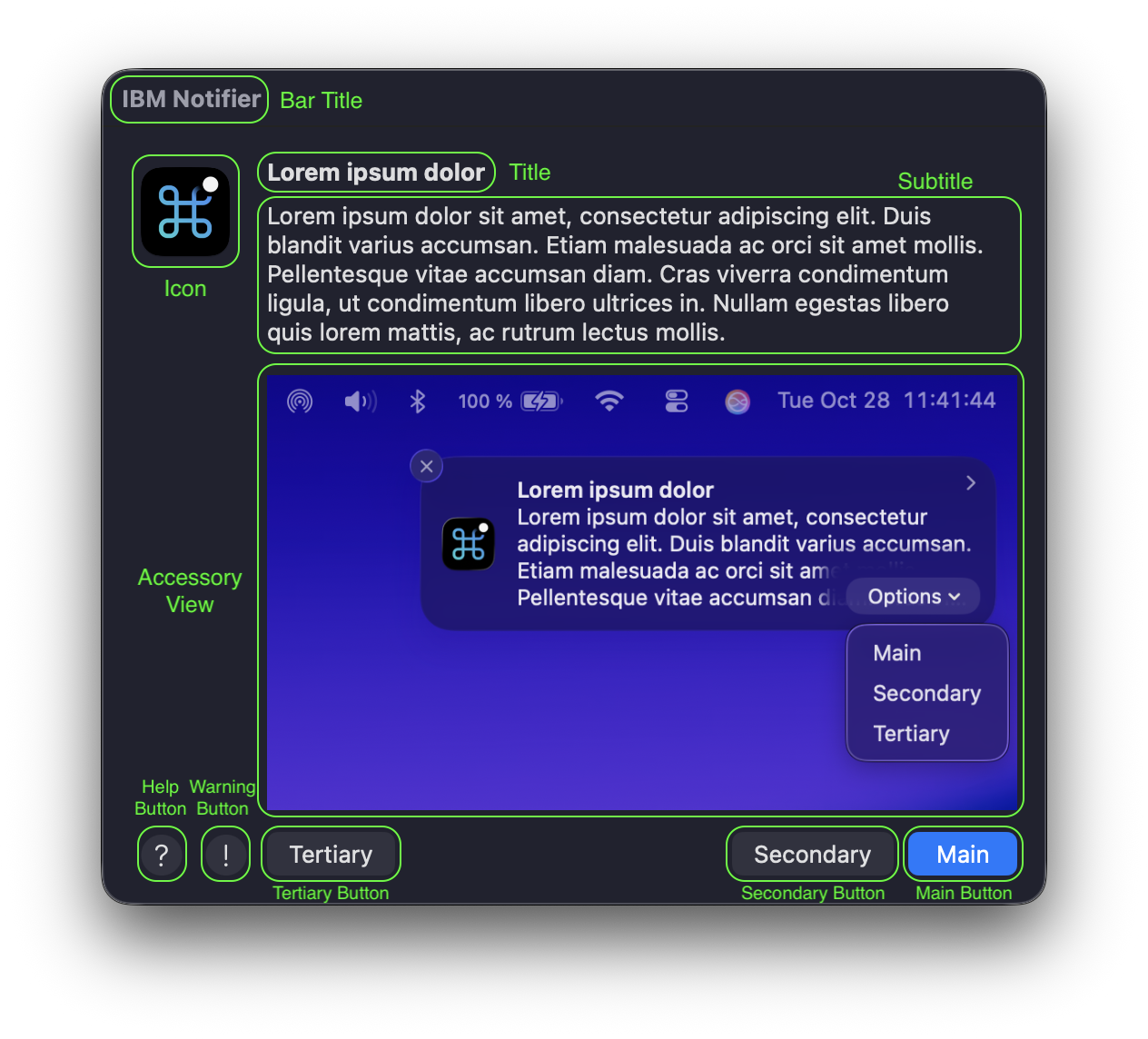
2023-02-16
- UPGRADE NOTICE: Any version of
superprior to 3.0b4 may unintentionally upgrade computers with macOS 12.6.2 to macOS 13.1+. You should avoid using any version ofsuperprior to version 3.0b4 on macOS 12 or newer. - New
--enforce-all-updatesoption installs all recommended (non-macOS) updates silently in the background even if there is no macOS update or upgrade required. Without using this option, the default behavior forsuperis to install recommended updates only after a macOS update/upgrade restart. - The macOS upgrade via MDM workflow now automatically logs out an active user moments before the system attempts to restart the computer. Thus, now all update and upgrade workflows (Intel, local authenticated, and MDM authenticated) should successfully force a restart.
- Improved notifications for the macOS upgrade via MDM workflow now show restart estimates more often and also warn the user before they are forcibly logged out before restarting.
- If needed, erase-install.sh is automatically updated to version 27.3. For compatibility with older systems,
supercontinues to use versions of erase-install.sh prior to version 28. - Resolved issues that caused download workflows to fail when only a single recommended (non-macOS) update was available.
- Resolved an issue that prevented
superfrom downloading the latest macOS upgrade installer. Now the latest version is calculated via the macOS installer build number. - Resolved an issue that prevented
superfrom completing the gatekeeper validation for the macOS upgrade installer. This was making macOS upgrades take longer than they should. - Improved
--test-modebehavior. - As always, countless logging refinements.
- Updated Jamf Pro extension attribute script now collects older versions of
superas well. (Thanks to @wakco for this one!) - Updated example MDM configuration profiles for
super3.0b7. super3.0b7 SHA-256: 23c6402379154f249d8ff6e1182bf500960fb118bdf16b4ccb01d6df26a91e85
2023-01-05
- UPGRADE NOTICE: Any version of
superprior to 3.0b4 may unintentionally upgrade computers with macOS 12.6.2 to macOS 13.1+. You should avoid using any version ofsuperprior to version 3.0b4 on macOS 12 or newer. - New support for macOS updates/upgrades when a system is enrolled in a beta seed program, as such
supernow properly detects and installs available macOS betas. - All logs now show the version of
superthat is running. - New Jamf Pro extension attribute script collects the currently installed
superversion. - macOS upgrade installers are now always downloaded and validated via specific build number (as opposed to version number).
- Resolved an issue that prevented software updates from downloading on macOS 12.0 - 12.2.
- Resolved an issue that prevented update/upgrade version numbers from displaying for MDM workflow dialogs on macOS 12.3 or newer.
- Improved failure detection, some logging refinements, and fixed a few typos for good measure.
- Updated
superremoval script now removes erase-install items and any update credentials previously saved bysuper. super3.0b6 SHA-256: b7bae8e206e6af5b3368a032853926830914a1ee9f6b66cc5e46b60b26d19cd3
2022-12-22
- UPGRADE NOTICE: Any version of
superprior to 3.0b4 may unintentionally upgrade computers with macOS 12.6.2 to macOS 13.1+. You should avoid using any version ofsuperprior to version 3.0b4 on macOS 12 or newer. - Dialog and Notification title bars now show the macOS update/upgrade version. For example, "macOS 13.1 Upgrade Requires Restart".
- Re-organized (yet again) the macOS upgrade list workflow to better accommodate macOS 12.3 or newer systems, as such...
- All macOS 12.3 or newer Intel computers and Apple Silicon computers using a local authentication workflow now always upgrade macOS via the much faster
softwareupdateworkflow. However... - All Apple Silicon computers using Jamf Pro API authentication now always upgrade macOS via the traditional installer workflow. (This is due to a limitation in the macOS MDM upgrade workflow, not in Jamf Pro or
super.) - All Intel computers now ignore the MDM update/upgrade workflow as it provides no benefit over standard local system (root) authentication.
- Resolved software update list cache validation issues on macOS 13.x.
- Resolved software update download issue on macOS 13.x. (Huge thanks to @PicoMitchell for helping with this one!)
- A variety of logging and timeout improvements including live macOS installer download progress status when watching
supervia command line. super3.0b5 SHA-256: 84023c8ccff2f22e5000fd35588935e5923b236cfc982b4686bc750f7908c2fc
2022-12-12
- UPGRADE NOTICE: Any version of
superprior to 3.0b4 may unintentionally upgrade computers with macOS 12.6.2 to macOS 13.1+. You should avoid using any version ofsuperprior to version 3.0b4 on macOS 12 or newer. - New
--allow-upgradeoption can automatically enforce all contemporary macOS upgrade workflows from macOS 10.14 (older macOS versions may work but are not tested) to macOS 13.x. This includes support for Intel, Apple Silicon via local authentication, Apple Silicon via Jamf Pro API authentication, and Apple Silicon user request (similar to Nudge). - New
--target-upgrade=versionoption allows you to specify a major macOS version (11, 12, or 13) as the maximum allowed macOS upgrade. - The previously introduced
--push-major-upgradeoption has been removed as it's no longer necessary becausesuperautomatically selects the most appropriate upgrade workflow. - New support for the "softwareupdate-based" upgrade workflow from macOS 12.3 or newer to macOS 13.x. This upgrade workflow is much faster than traditional macOS installation-based upgrades.
- New automatic installation of erase-install.sh to facilitate downloading the full system installer that is required for upgrading older macOS versions.
- To reliably support all macOS upgrade workflows, the minimum supported version of Jamf Pro is now 10.38 or newer.
- Completely re-written download workflow always downloads the appropriate macOS update or upgrade locally (no more failed MDM downloads!) before prompting the user to restart.
- Significantly improved download validation and caching mechanisms further enhance download reliability and performance.
- All recommended (non-macOS) software updates now install immediately after the system is restarted. This is to avoid interrupting the user (when updating things like Safari) and to avoid unnecessary installations if performing a macOS upgrade.
- Boolean options (on/off) can now be specified using a more uniform "on" or "off" in the option's name. For example, test mode can now be enabled with the original
--test-modeor the new--test-mode-onand toggled off with the original--no-test-modeor the new--test-mode-off. - For macOS 13 or newer, there is now a Managed Login Item Configuration Profile example for use when deploying
superto managed systems. - The logs maintained by
superhave (once again) been renamed to facilitate the new update/upgrade workflows. As always, the log descriptions and locations can be found in the internalsetDefaults()function. - Significantly improved logging now identifies more failure modes and also includes live macOS update/upgrade download progress status when watching
supervia command line. - Countless log text changes, comment text clarification, and internal object renaming to facilitate new update/upgrade workflows.
- It's no longer necessary to specify the
--skip-updates-onoption with the--policy-triggersoption to run Jamf Pro Policies when there are no macOS updates/upgrades available. super3.0b4 SHA-256: 4e62e721266ccb4e93fad48c9e928f3a29eb2ab62e10a83950a7728a59863fb6
2022-11-03
- New timeouts for each distinct update phase. These timeouts can be customized in the
setDefaults()function of the script;checkTimeoutSECONDS=120,recommendedTimeoutSECONDS=300,mdmTimeoutSECONDS=120,downloadTimeoutSECONDS=120,prepareTimeoutSECONDS=600,applyTimeoutSECONDS=60, andasuTimeoutSECONDS=300. - Optimizations to the major system upgrade detection that improve reliability and performance.
- Fixed issues that prevented the post-restart validation workflow from running and completing after installing a minor system update via
softwareupdate. - A wide variety of general and
--verbose-modelogging improvements. super3.0b3 SHA-256: e845729d8227d5c71e25971464e99ad477aaca7f1b6970fec6aeb05c4beb6948
2022-10-22
- Renamed the option to prefer
jamfHelperdialogs and notifications to--prefer-jamf-helper. Likewise, the managed preference key has also been renamed toPreferJamfHelper. - Resolved issue with invalid logging function reference (Thanks to @iDrewbs!)
- The
<key>PushMajorUpgrade</key>is now in the All Options config profile examples. super3.0b2 SHA-256: a840e6dfeca4ece84b79969e41f2c077fc671f5c71893a23d65030a5c1c77f9c
2022-10-21
- New support for macOS Ventura 13.
- New
--push-major-upgradeoption (macOS 11.5 or newer and managed by Jamf Pro) attempts to perform a major macOS upgrade via MDM command. - New "Software Update Failed" notification when things go wrong after the user has already been notified to expect a restart... keep reading for further explanation...
- New
SuperStautskey in the/Library/Management/super/com.macjutsu.super.plistmaintains the current status ofsuper. This allows for easy querying of the generalsuperstatus without viewing the entiresuper.log. Here is a Jamf Pro Extension Attribute script to collect this when inventory is updated. - New
SuperPendingkey in the/Library/Management/super/com.macjutsu.super.plistmaintains the pending restart date ofsuper. This allows for easy querying of the generalsuperpending restart date without viewing the entiresuper.log. Here is a Jamf Pro Extension Attribute script to collect this when inventory is updated. - New
superremoval script stops any activesuperinstance, super helpers, and removes allsuperitems (excluding helpers). - New local log
/Library/Management/super/check.logmaintains the lastsoftwareupdatecheck results. - New local log
/Library/Management/super/asu.logkeeps a history ofsoftwareupdatedownload and installation attempts. - Significant internal rearchitecting to support major macOS upgrades (more upgrade workflows coming soon including full installer options).
- Significant internal rearchitecting to accommodate update/upgrade workflows that hang. Specifically, if any update/upgrade times out after 600 seconds of inactivity,
superautomatically tries again later. (Thanks to @scriptingosx and #scripting on MacAdmins Slack!) - Significant internal rearchitecting to harden
superagainst run-time errors. Specifically,superonly exits due to errors during the initial installation and startup. After installation and startup is complete, if any error occurs,superautomatically restarts later, even if the system is unexpectedly restarted. - Rebuilt initial installation and startup workflow reports all exit errors to the
superparent process (Terminal, Jamf Pro, etc.). - Rebuilt initial installation and startup workflow only installs dependencies when required. For example, the
--prefer-jamfoption prevents the automatic installation of IBM Notifier. - Rebuilt update/upgrade checking workflow is instantaneous if a check has already occurred in the last 6 hours (the default for the built-in automatic
softwareupdatecheck). (Thanks to @grahampugh for this suggestion!) - Rebuilt update/upgrade checking workflow times out after 120 seconds of inactivity, in which case
superautomatically tries again later. - Misbehaving
softwareudatedprocesses are automatically punished with a "kickstart" restart. - Improvements to
--verbose-modenow show more detail including (when appropriate) the active script function name. - Improvements to
--reset-supernow resets cached update results and all deferral counters. - Improvements to
--test-modenow properly resets deferral counters. - Reliability improvements to the Jamf Pro API token request workflow.
- Various improvements to general logging including new details regarding system architecture, version, and expected update/upgrade workflows.
- Various improvements to script commenting, including new mark directives that appear in supported code editors. (Thanks to @scriptingosx for inspiration.)
- Starting with
super3.0b1, checksums are provided with each release... super3.0b1 SHA-256: e1b16ed4dd307fa4a19cf987bddd2010dee0ec2cdd33acd25d2b4320507f2136
2022-09-02
- The S.U.P.E.R.M.A.N. Wiki is finally helpful!
- Detailed help removed from within the
superscript because... - If there is a current GUI user, the
--helpoption now automatically opens the S.U.P.E.R.M.A.N. Wiki. If there is no current GUI user, this option shows basic usage. - Spellcheck! So. Many. Typos.
2022-08-23
- Validated against the late August 2022 Apple Security Updates.
- The Jamf Pro API token is now invalidated when
superexits (previously it was only deleted from local memory). - You can now set custom dialog timeout text for both the "Ask for Update" and "Soft Deadline" dialogs in the
setDisplayLanguage()function. - IBM Notifier Version 2.8.0 Build 87 is automatically downloaded and installed to the
superworking folder. - Resolved an issue where deleting account credentials did not set the appropriate update workflow.
2022-08-01
- Re-arranged the main workflow so that if there is no current user, then the system update is attempted immediately, thus skipping the pre-download functions. This prevents an issue where in some cases
softwareupdatewas re-downloading the system update. - Significant rewrite of the
softwarupdateworkflows to fully support macOS 11 and newer on both Intel and Apple Silicon computers. The previous "macOS Monterey Notification Fix" is no longer necessary. (Huge thanks to @StephenGrall for help on this!) - The MDM update workflow via Jamf Pro is now supported on both Intel and Apple Silicon computers running macOS 11.5 and newer.
- Credentials for the MDM update workflow via Jamf Pro are now validated and saved on all versions of macOS, thus allowing for use of the MDM update workflow once the system has reached macOS 11.5 or newer.
- Updated the
checkCurrentUser()function with more resilient code that now also collects the current UID. - Resolved an issue when validating the maximum seconds for the
--recheck-deferoption.
2022-06-16
- There are so many new features in
super2.x that any existing scripts, Configuration Profiles, or other workflows designed forsuper1.x are not compatible withsuper2.x. Please reviewsudo super --helpin addition to this change log! - All option flags with a variable value now require the use of equals ( = ). For example,
--default-defer=3600. However, quoting is no longer required for option variables (unless they use a reserved character like "space"). - When running
supervia Jamf Pro Policy, you can now use script Parameter Values for configuration. However, you can only use one option per Parameter Value, so you are limited to a total of 8 options with this method. Obviously, you should consider using a Configuration Profile for setting more options. - New
--recheck-defer=secondsoption allowssuperto re-run on a regular basis even when no Apple software updates are found. Thus,super"remains active" to enforce ongoing Apple software update checking. - Significantly updated deferral mechanism now allows for all deadline types (focus, soft, and hard) for all deferral types, including...
- New
--focus-days=number,--soft-days=number, and--hard-days=numberoptions allow you to specify a maximum number of days to defer after an Apple software update is found. - New
--zero-day=YYYY-MM-DD:hh:mmoption allows you to specify a manual day zero instead of relying on the default automatic zero day, which is based on when new Apple system updates are available. - Maximum deferral count and maximum deferral days deadlines can now be restarted with the
--restart-countand--restart-daysoptions. - Multiple options of a similar type can now be deleted with a single option. This includes:
--delete-deferrals,--delete-counts,--delete-days,--delete-dates, and--delete-accounts. - Improved icon scaling when using the
--icon-size-ibmoption courtesy of... - IBM Notifier Version 2.7.1 Build 81 is automatically downloaded and installed to the
superworking folder. - As a default behavior, the
--policy-triggersoption now waits for restart-required system updates to become available before running any Jamf Policy Triggers. Alternately, you can combine this option with the--skip-updatesoption to run the Jamf Policy triggers without waiting for a restart-required system update. - The
--clear-superoption is renamed to--reset-superand also includes improved logging. - Improved behavior for the
--open-logsoption. - All notification and dialog text strings are now consolidated into a single, easier-to-customize,
setDisplayLanguage()function. - MDM workflow parsing updates should improve detection of MDM download and install progress.
- A lot of documentation improvements and internal refactoring to align with new features and renamed options.
2022-05-25
- No code changes in
superscript. - Significant macOS Monterey requirement changes to work around
softwareupdateworkflows that are hanging during system update downloads. Please see the "macOS Monterey Notification Fix Requirement" section. (#11, thanks to @KMudedla).
2022-05-20
- Resolved missing code that prevented the
PreferJamfmanaged preference key from being respected. - The
--prefer-jamfoption now results in an exit error if run from a computer with no Jamf binary.
2022-05-16
- When used with Jamf Pro 10.38 or newer, all MDM software update commands now use the Jamf Pro API (as opposed to the Classic API).
- When used with Jamf Pro 10.38 or newer, system updates via MDM now force a restart by killing any apps that don't quit when requested.
- More reliable logging when downloading and preparing updates via MDM.
- The
--verbose-modeoption now shows the percentage complete when downloading and preparing updates via MDM. - The
--policy-triggersoption now detects when Jamf Pro Policies complete with success or failure. If all Jamf Pro Policies completed, then the--policy-triggersoption is automatically cleared. - Various code syntax changes per ShellCheck recommendations.
2022-05-10
- The super workflow now automatically installs all available non-restart required "recommended" Apple software updates on both Intel and Apple Silicon computers prior to downloading any restart required system updates. Thus, all non-restart required updates are installed before the user is prompted to restart.
- Jamf Pro inventory is now updated immediately after non-restart required "recommended" Apple software updates are automatically installed.
- The current user is now checked immediately before any prompts in case super has been running for a while (due to earlier installations or downloads).
- Re-built software update checking functions to improve reliability, logging, and allow for future improvements.
- The
--policy-triggersoption no longer requires the--force-restartoption to take advantage of dialogs, notifications, deferrals, and deadline workflows. This allows Jamf Pro Policies to control when the computer restarts. - The
--policy-triggersoption now requires a local Jamf binary. - The
--force-restartoption no longer requires a local Jamf binary. Now usingshutdown -o -r +1instead. - The
--open-logsoption now works with older versions of macOS. However, detailed MDM andsoftwareupdatelogs are still only available for macOS 11 or newer. - Startup workflow now kills any previous IBM Notifier instance.
- Jamf Pro Policies now called via
-eventinstead of legacy-trigger(#5, thanks to @kenchan0130). - Resolved text encoding issue causing "?" to appear in notifications and dialogs (#6, thanks to @kenchan0130).
2022-03-14
- Jamf Pro no longer required for
softwareupdateworkflows. - Initial commits to GitHub including Apache 2.0 LICENSE and CHANGELOG.md.
- Introductory comments moved to README.md.
- Example managed preference file com.macjutsu.super.plist
2022-03-09
- IBM Notifier is automatically downloaded and installed to the
superworking folder. - IBM Notifier is default for all user interactions, but if IBM Notifier.app can't be downloaded or is invalid then super falls back to
jamfHelper. - Ability to specify custom icon size when using IBM Notifier via
--icon-size-ibm pixelsoption and managed preference:<key>IconSizeIbm</key> <string>number</string> - Ability to specify custom icon size when using
jamfHelpervia--icon-size-jamf pixelsoption and managed preference:<key>IconSizeJamf</key> <string>number</string> - Ability to prefer
jamfHelperover IBM Notifier via--prefer-jamf | --no-prefer-jamfoptions and managed preference:<key>PreferJamf</key> <true/> | <false/> - Deferral times all normalized to between 120 seconds and 86400 seconds (1 day).
- Bug fixes and improvements for display redraw, display timeout, and test mode options.
- Logging and verbose mode improvements.
2022-02-28
- Initial private release.