Cc: @calumjs @ricksu978 @adamcogan
Hi
🟥 Watch the video (31 sec)
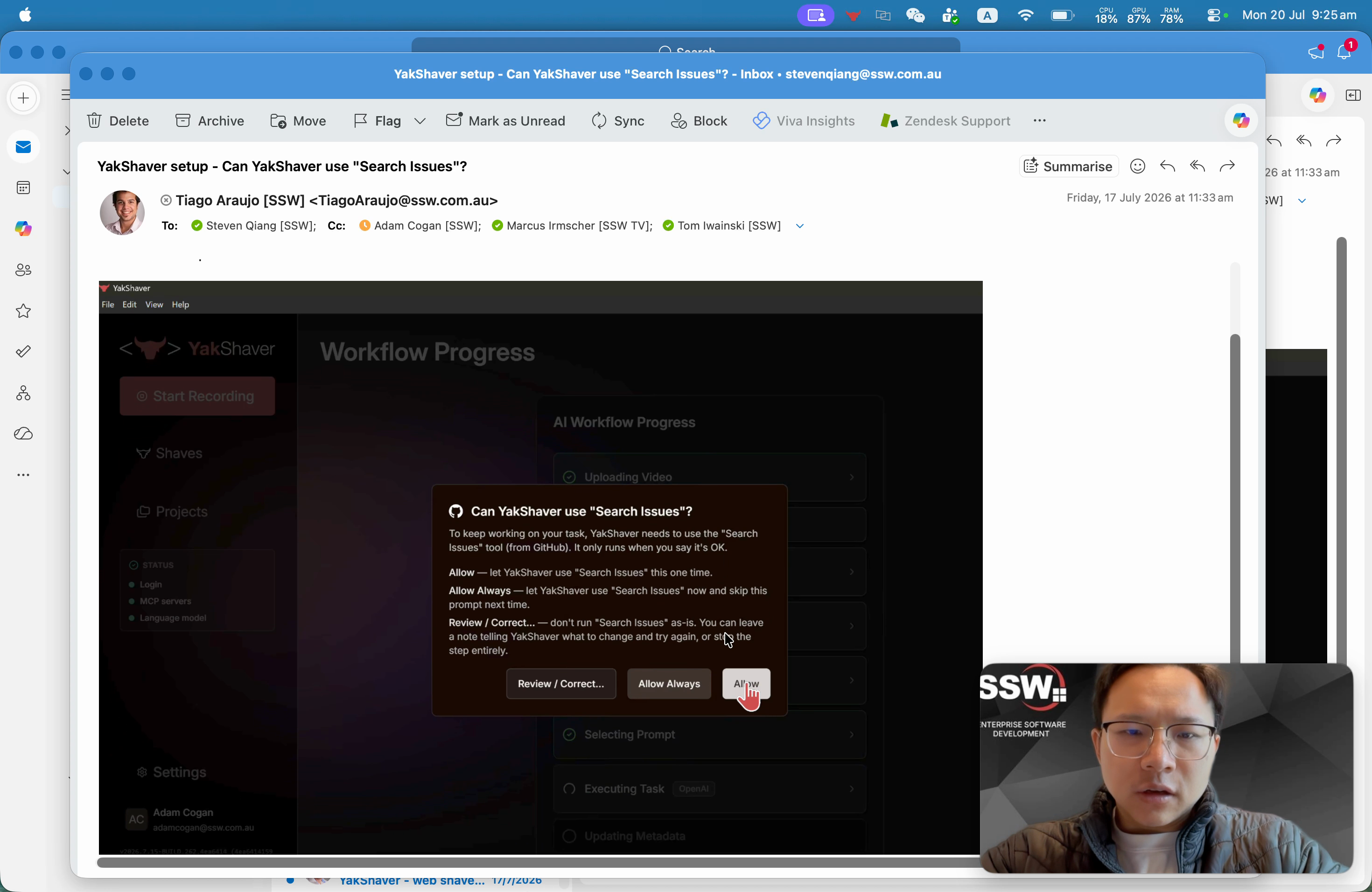
Figure: Current in-app prompt asking for permission to use MCP tools/capture a video frame is too verbose and unclear
Pain
During the YakShaver Desktop flow, the app asks for permission to use MCP tools. The current permission prompt copy is too wordy, which makes it harder to understand quickly (especially for non-technical users) and creates friction at a critical step.
Suggested Solution
Rewrite the MCP tools permission prompt into simpler, user-friendly language.
Guidelines for the rewrite:
- Use plain language.
- Keep the message short and scannable.
- Make it clear what YakShaver wants to do and why.
- Make it clear what happens if the user denies the permission.
Acceptance Criteria
- The MCP tools permission prompt copy is rewritten to be shorter and easier to understand.
- The prompt explains (in plain language) why YakShaver needs the permission.
- The prompt makes clear the impact of denying the permission.
- The wording remains consistent with YakShaver’s tone of voice.
Tasks
More Information
Related (similar area): #783 (Improve permission prompt copy)
Screenshots
Thanks!

Cc: @calumjs @ricksu978 @adamcogan
Hi
🟥 Watch the video (31 sec)
Figure: Current in-app prompt asking for permission to use MCP tools/capture a video frame is too verbose and unclear
Pain
During the YakShaver Desktop flow, the app asks for permission to use MCP tools. The current permission prompt copy is too wordy, which makes it harder to understand quickly (especially for non-technical users) and creates friction at a critical step.
Suggested Solution
Rewrite the MCP tools permission prompt into simpler, user-friendly language.
Guidelines for the rewrite:
Acceptance Criteria
Tasks
More Information
Related (similar area): #783 (Improve permission prompt copy)
Screenshots
Thanks!